Chatup
 Saroj Lakum
Build a production-ready iOS real-time chat application using Swift and UIKit for iOS 15 and above. Provide secure registration/login, profile completion, user discovery, one-to-one/group chat, multimedia messaging, presence, typing, message status, notifications, profile management, logout, and account deletion. Use Firebase as the backend platform, including Firebase Authentication, Cloud Firestore, Firebase Realtime Database, Firebase Storage, and Firebase Cloud Messaging. Do not use SwiftUI. Use clean MVVM with separate ViewControllers, ViewModels, models, repositories, Firebase services, and business logic. ViewControllers should remain lightweight and should not contain Firebase business logic. Use protocols and dependency injection where useful, follow Swift best practices, prevent retain cycles, handle async operations correctly, and keep the code testable. On launch, determine authentication and profile state. New users can register with email/password through Firebase Authentication. Existing users can log in/reset passwords; persist authentication sessions. After signup, create a Firestore user document and require profile completion before entering the main application. Complete Profile must require first name, last name, phone number, and photo and cannot be skipped. Store profile information in users/{uid} and set profileCompleted to true. Route incomplete users to Complete Profile, complete users to the app, and others to Login/Signup. The main application must contain exactly three UIKit tabs: Chat, Friends, and Profile. Hide the tab bar during authentication/profile completion. Profile displays first name, last name, email, phone, photo, and About/Status. Users can edit profile information and photo. Store profile photos in Firebase Storage and save the URL/reference in Firestore. Provide Logout and confirmed Delete Account. Delete Account removes the Auth account, users/{uid}, and profile photo. Friends is a global directory without friend requests. Show all users except the current user with photo, name, email, and online/offline status. Support name search. Selecting a user opens an existing chat or creates one. Chat displays one-to-one and group conversations sorted by latest activity, showing name, photo, latest message, timestamp, and unread count. Users can open chats, start chats from Friends, and create groups. One-to-one chat must use Cloud Firestore real-time snapshot listeners. Users can send and receive text, images, audio/voice messages, and videos. Support timestamps, Sent/Delivered/Read status, typing, and real-time updates. Composer supports text, audio recording, camera, and photo/video library. Paginate message history. Enable Firestore offline persistence and sync supported operations after reconnecting. Users can create groups by selecting registered users and providing a group name and optional group photo. The creator becomes Group Admin. Groups support real-time messaging, sender name/avatar, member management, rename, photo change, leaving, and aggregate "seen by" count. Only administrators can perform administrative operations; any member can leave. Support up to 100 members. Support four message types: text, image, audio, and video. Images can be captured using the camera or selected from the photo library, compressed, uploaded to Firebase Storage, referenced from Firestore, displayed as thumbnails, and opened in a full-screen viewer. Audio messages can be recorded in-app, uploaded to Storage, referenced in Firestore, and played with play/pause and progress controls. Videos can be captured or selected, compressed, uploaded to Storage, represented by a Firestore media reference, shown with thumbnails, and played in-app. Media uploads should provide progress and handle failures. Messages must support Reply, Forward, Delete for Me, Delete for Everyone, Copy, and emoji Reactions. Reply retains the original message ID, sender, and suitable content/type information and displays a quoted preview. Forward text, image, audio, and video messages to other one-to-one or group chats. Delete for Me removes a message only from the current user's view. Delete for Everyone allows the sender to remove their own message for all participants within a configurable period, with 24 hours as the default. Display "This message was deleted" after deletion. Allow copying text messages where appropriate. Reactions must be visible to all participants. Group conversations should provide aggregate seen-by information. Use Firebase Realtime Database for typing and presence. Typing can use /typing/{chatId}/{userId}; presence can use /presence/{userId} containing state and lastChanged. Typing should update in near real time without excessive writes and stop when typing ends or the user leaves the chat. Presence should correctly handle connectivity changes and show online/offline information in Friends and relevant areas. Use Cloud Firestore for users, conversations, groups, and messages. The users/{userId} document should contain firstName, lastName, email, phoneNumber, photoURL, status, fcmToken, isOnline, lastSeen, createdAt, and profileCompleted. chats/{chatId} should contain type, participants, groupName, groupPhoto, lastMessage, lastMessageType, lastMessageTimestamp, unreadCount, and admins. Store messages under chats/{chatId}/messages/{messageId}, with senderId, type, content/mediaURL, thumbnailURL, mediaDuration, reply information, forwarding information, reactions, timestamp, status, deletedFor, and isDeletedForEveryone. Use Firestore server timestamps where appropriate and avoid inefficient reads/writes. Use Firebase Storage for profile photos and message media. Organize storage paths using user, chat, and message identifiers. Do not store large binary files in Firestore. Compress media before upload when appropriate and secure Storage access with Firebase Security Rules. Integrate Firebase Cloud Messaging for push notifications. When a new message arrives while the application is backgrounded or killed, show sender name and text preview or a media label such as Photo, Video, or Audio. Tapping a notification should open the relevant conversation. Store and refresh FCM tokens correctly and support APNs configuration for production notifications. Security must be enforced through Firebase Security Rules, not only UI restrictions. Only authenticated users can access protected resources. Users can access only authorized conversations and should not modify other users' profiles. Group administration must be restricted to administrators, and message operations must follow appropriate permissions. Storage access must also be restricted. Never hard-code sensitive credentials. Support Light Mode and Dark Mode, iPhone screen sizes, safe areas, keyboard handling, accessibility, responsive layouts, and Apple's Human Interface Guidelines. The interface should be modern, clean, responsive, and optimized for smooth chat scrolling. Use reusable UIKit components for user cells, chat cells, message cells, avatars, presence indicators, media messages, loading states, empty states, and errors. Required screens include Splash/Onboarding, Login, Signup, Forgot Password, Complete Profile, Main Tab Bar, Chat List, Friends, Profile, Edit Profile, New Chat, Create Group, Chat Screen, Media Viewer, Audio Player, Message Action Sheet, Group Info, and Group Member Management. Develop incrementally. First create the Xcode project foundation, UIKit structure, MVVM architecture, Firebase configuration, folder organization, navigation, theme and common utilities. Then implement authentication and profile completion, followed by Profile, Chat, Friends, and user directory. Next implement one-to-one real-time messaging, pagination, message status, typing, and offline support. Then implement groups and administration, multimedia messaging and Storage, message reply/forward/delete/reactions, FCM notifications, security rules, performance optimization and testing. Before each feature, inspect the project and identify the approach and files to create/modify. Implement only the requested functionality and do not modify unrelated files. Do not migrate UIKit to SwiftUI, change the iOS deployment target, introduce unnecessary dependencies, or change Firebase technology choices without approval. Handle loading, empty, offline, success, and error states. Properly manage Firebase listeners, asynchronous operations, memory, network failures, and permissions. After each stage, summarize modified files and validation. Build and test relevant functionality. If a requirement is ambiguous, identify it rather than inventing behavior. The final application must be secure, scalable, maintainable, performant, and provide a complete real-time messaging experience using Swift, UIKit, and Firebase.


Comments (0)
Sign in to leave a comment
System Requirements
Chatup System Requirements Document
1. Introduction
This document outlines the system requirements for the Chatup project, a production-ready iOS real-time chat application using Swift and UIKit for iOS 15 and above. The application will leverage Firebase for backend services and will include comprehensive user features, ensuring security and performance.
2. System Overview
Chatup is designed to provide a seamless real-time messaging experience with secure user authentication, profile management, and multimedia messaging capabilities. The application will support both one-to-one and group chats, multimedia messaging, and user presence indicators, all while adhering to Apple's Human Interface Guidelines.
2a. Product Interpretation and Delivery Boundary
-
Domain Descriptors:
- Real-time Messaging: Enable users to communicate instantly through one-to-one and group chats.
- User Authentication and Profile Management: Ensure secure access and personalized user experience.
-
What is being built:
- A real-time chat application with secure registration/login, profile completion, user discovery, one-to-one/group chat, multimedia messaging, presence, typing indicators, message status, notifications, profile management, logout, and account deletion.
-
Excluded Assumptions:
- Generic e-commerce features
- Non-source-backed enterprise modules
-
Access:
- Application-owned identity with Firebase Authentication for secure access control.
-
Behavior Contracts:
- User Registration: Users can register with email/password, creating a Firestore user document.
- Profile Completion: Users must complete their profile before accessing main features.
- Real-time Messaging: Users can send and receive messages in real-time.
- Group Management: Administrators can manage group settings and members.
2b. Page Content and Component Coverage
- Splash/Onboarding: Introduction and setup for new users.
- Login: User authentication entry point.
- Signup: New user registration.
- Forgot Password: Password recovery for users.
- Complete Profile: Ensure user profiles are complete before accessing main features.
- Main Tab Bar: Primary navigation for main features.
- Chat List: Display of user conversations.
- Friends: Global directory of users.
- Profile: User profile display and management.
- Edit Profile: Allow users to update their profile information.
- New Chat: Initiate new conversations.
- Create Group: Create new group chats.
- Chat Screen: Real-time messaging interface.
- Media Viewer: View media content in full screen.
- Audio Player: Playback audio messages.
- Message Action Sheet: Perform actions on messages.
- Group Info: Manage group chat details.
3. Functional Requirements as Story Points
- As a User, I should be able to register with an email and password to create an account.
- As a User, I should be able to log in and reset my password if needed.
- As a User, I should be able to complete my profile with first name, last name, phone number, and photo.
- As a User, I should be able to view and edit my profile information.
- As a User, I should be able to discover other users and view their profiles.
- As a User, I should be able to start one-to-one and group chats.
- As a User, I should be able to send and receive text, images, audio, and video messages.
- As a User, I should be able to see typing indicators and presence status of other users.
- As a User, I should be able to receive notifications for new messages.
- As an Administrator, I should be able to manage group settings and members.
- As a User, I should be able to log out and delete my account.
4. User Personas
- User: The primary participant interacting with the app, capable of messaging and managing their profile.
- Administrator: A user with additional privileges to manage group chats and perform administrative tasks.
5. Core User Flows
-
Registration and Login Flow:
- User opens the app and sees the Splash/Onboarding screen.
- User navigates to the Signup screen to register or the Login screen to log in.
- Upon successful login, if the profile is incomplete, the user is directed to the Complete Profile screen.
-
Profile Management Flow:
- User accesses the Profile screen from the Main Tab Bar.
- User can view and edit their profile information on the Edit Profile screen.
-
Messaging Flow:
- User navigates to the Chat List from the Main Tab Bar.
- User selects a conversation to open the Chat Screen.
- User can send messages and view message status in real-time.
-
Group Management Flow:
- Administrator accesses the Group Info screen to manage group settings and members.
6. Visuals Colors and Theme
- Primary: #007AFF (iOS Blue)
- Primary Light: #5AC8FA
- Secondary: #34C759 (iOS Green)
- Accent: #FF9500 (iOS Orange)
- Highlight: #FF3B30 (iOS Red)
- Background: #FFFFFF (Light Mode), #000000 (Dark Mode)
- Surface: #F2F2F7 (Light Mode), #1C1C1E (Dark Mode)
- Text: #000000 (Light Mode), #FFFFFF (Dark Mode)
- Text Muted: #8E8E93
- Border: #C7C7CC
7. Signature Design Concept
The Chatup app will feature a modern and clean interface optimized for smooth chat scrolling. The design will adhere to Apple's Human Interface Guidelines, supporting both Light and Dark Modes. The interface will be responsive, with reusable UIKit components for user cells, chat cells, message cells, avatars, presence indicators, media messages, loading states, empty states, and errors.
8. Interaction Model & Motion Direction
- Interaction Model: Animated
- Moderate scroll-triggered reveals and hover transitions.
- Spring physics on interactive elements for a polished user experience.
9. Non-Functional Requirements
- Security: Enforced through Firebase Security Rules.
- Performance: Optimized for smooth chat scrolling and efficient Firebase operations.
- Scalability: Support for up to 100 group chat members.
- Accessibility: Compliance with Apple's Human Interface Guidelines for accessibility.
10. Tech Stack
- Frontend: Swift and UIKit for iOS 15+
- Backend: Firebase (Authentication, Cloud Firestore, Realtime Database, Storage, Cloud Messaging)
11. Assumptions and Constraints
- The application will not use SwiftUI.
- Firebase will be the sole backend platform.
- The application will support iOS 15 and above.
12. Glossary
- MVVM: Model-View-ViewModel, a design pattern for separating concerns in the codebase.
- Firestore: A NoSQL cloud database to store and sync data for client- and server-side development.
- Firebase Authentication: A service that provides backend services, easy-to-use SDKs, and ready-made UI libraries to authenticate users.
- Firebase Cloud Messaging (FCM): A cross-platform messaging solution that lets you reliably send messages at no cost.
- UIKit: A framework that provides the required infrastructure for iOS apps.
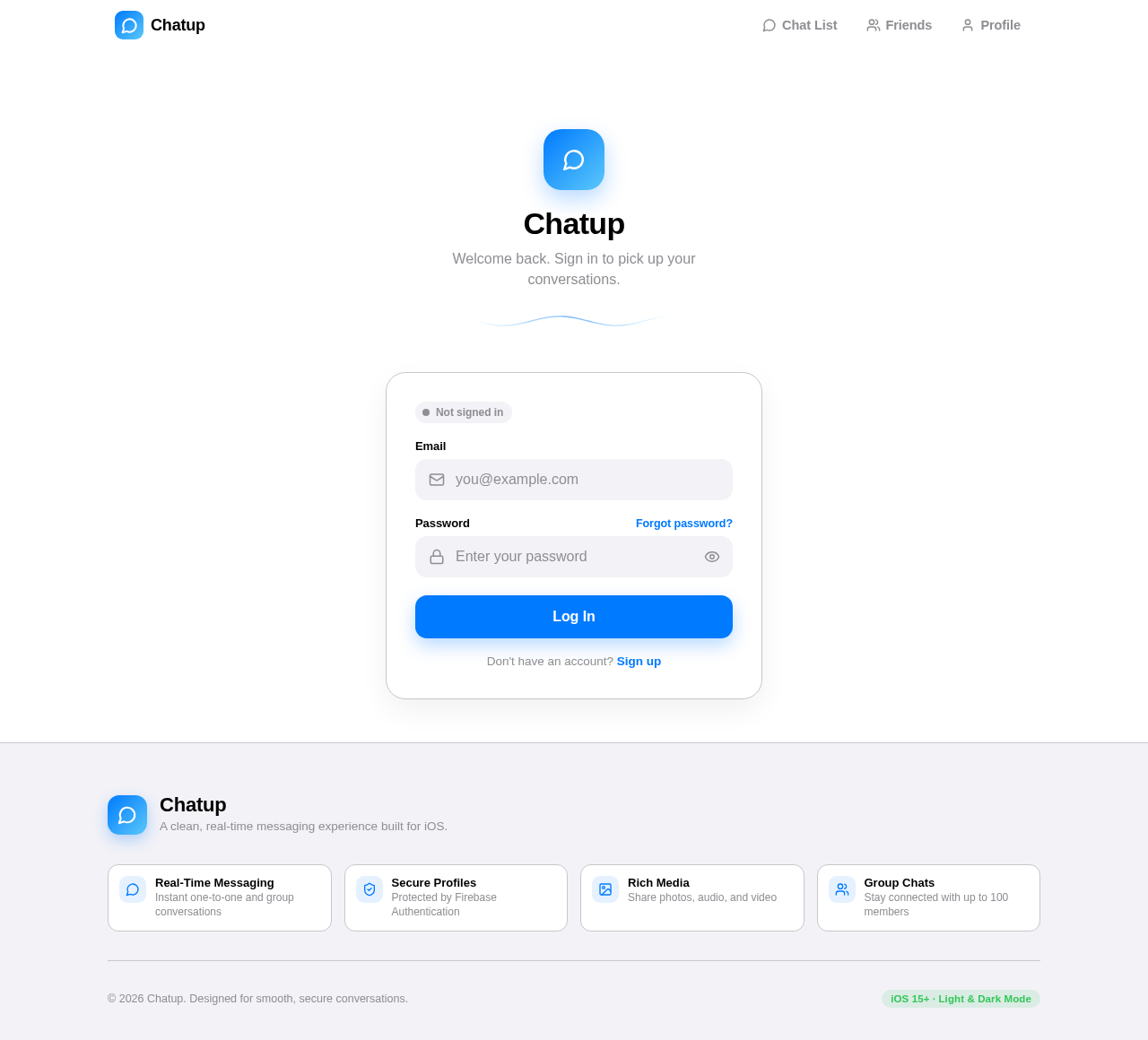
Chatup
Welcome back. Sign in to pick up your conversations.
Chatup
Welcome back. Sign in to pick up your conversations.
No comments yet. Be the first!