Chatterbot AI
 Special
make a smart AI called "Chatterbot: Inspired by Claude" it will have the UI theme of ChatGPT and Perplexity. You will also have unlimited uploads of files, photos, etc. It will also allow you to send videos and voice notes. the theme will be a dark (not too dark) green color. it will also have the Live Chat option like ChatGPT. It will also have a personalization option like ChatGPT where you can input a prompt, and it will follow by it. and if you don't like the normal default color, in the personalization tab, add a "Change color option". it will also have a chat history (like all the other AI Chatbots). And make the logo something like Claude's logo. and don't theme the whole UI. just like the text bubble and the send button. also add a greeting screen like Claude. It should also have a live chat option with different voices you can choose from. it should also have a log in option. Also make it be able to have casual chats. in the Personalization menu, make it have the option to add subtitles when using live chat. Also let it search the internet if it needs to and when it responds to a message, make it have the response style of ChatGPT. Also, dont make it have suggestions on the greeting screen


Comments (0)
Sign in to leave a comment
System Requirements
Chatterbot AI
Introduction
Chatterbot AI is an advanced conversational AI platform inspired by Claude, designed to provide users with a personalized and interactive chat experience. The project aims to combine the intuitive UI themes of ChatGPT and Perplexity, offering a range of features tailored to meet personal and coding needs.
System Overview
Chatterbot AI is designed to be a smart conversational assistant with a focus on personalization and user engagement. It offers features such as unlimited file uploads, video and voice note sharing, live chat with voice options, and a coding section for automated code generation. The system will support internet searches for enhanced responses and provide a customizable UI theme with a default dark green color scheme. Users can personalize their experience further through a dedicated personalization menu.
Functional Requirements
- As a User, I should be able to upload unlimited files, photos, and videos.
- As a User, I should be able to send voice notes.
- As a User, I should be able to engage in live chat with different voice options.
- As a User, I should be able to personalize the chat experience by inputting a prompt.
- As a User, I should be able to change the UI color theme in the personalization tab.
- As a User, I should be able to view chat history.
- As a User, I should be greeted with a welcome screen similar to Claude's.
- As a User, I should be able to log in to access personalized features.
- As a User, I should be able to have casual chats with the AI.
- As a User, I should be able to add subtitles during live chat sessions.
- As a User, I should be able to have the AI search the internet for information.
- As a User, I should receive responses styled like ChatGPT.
- As a User, I should be able to access a coding section to describe what I want built and have the AI generate the code automatically.
User Personas
- General User: Individuals seeking a conversational AI for personal assistance and casual chats.
- Coder: Users who require assistance in coding and want to leverage AI for automated code generation.
Core User Flows
- General User logs in -> Personalizes chat settings -> Engages in casual chat -> Uploads files/photos/videos -> Sends voice notes -> Views chat history.
- Coder accesses coding section -> Describes desired application -> AI generates code -> User reviews and implements code.
Visuals Colors and Theme
- primary: #2E8B57 (Dark Green)
- primary_light: #66CDAA (Medium Aquamarine)
- secondary: #FF6347 (Tomato)
- accent: #FFD700 (Gold)
- highlight: #FFA07A (Light Salmon)
- bg: #1C1C1C (Dark Charcoal)
- surface: rgba(34, 34, 34, 0.8)
- text: #FFFFFF (White)
- text_muted: #B0C4DE (Light Steel Blue)
- border: rgba(255, 255, 255, 0.2)
Signature Design Concept
The Chatterbot AI homepage will feature an interactive "Digital Garden" concept. Users will navigate through a lush, animated garden where each plant represents a feature or section of the app. Using @react-three/fiber and @react-three/drei, the garden will be a 3D environment where users can click on plants to open feature cards. The garden will subtly change colors based on the time of day, providing a dynamic and immersive experience. Hovering over plants will trigger gentle animations, and clicking will cause the plant to bloom, revealing more information about the feature.
Interaction Model & Motion Direction
The landing page will utilize a "parallax" interaction model, creating a sense of depth as users scroll through the digital garden. Decorative elements will move at different speeds, enhancing the storytelling aspect of the app. Internal pages, such as the coding section and personalization menu, will adopt a "static" interaction model for clarity and ease of use.
Non-Functional Requirements
- The system should support high availability and scalability to handle a large number of concurrent users.
- The UI should be responsive and accessible across various devices and screen sizes.
- The system should ensure data privacy and secure access control for user information.
Tech Stack
- Frontend: React for Web
- Backend: Python, FastAPI
- Database: MongoDB
- AI Models: GPT 5.4 for user-friendly responses, Claude 4.6 Opas for coding assistance
- AI Tools: Litellm for LLM Routing, Langchain
- Local Orchestration: Docker, docker-compose
- Server-side Orchestration: Kubernetes
Assumptions and Constraints
- The system assumes users have internet access for full functionality.
- The personalization options are limited to UI themes and chat settings.
- The coding section assumes a basic understanding of programming concepts by the user.
Glossary
- AI: Artificial Intelligence
- UI: User Interface
- LLM: Large Language Model
- Parallax: A scrolling technique that creates an illusion of depth by moving background and foreground elements at different speeds.
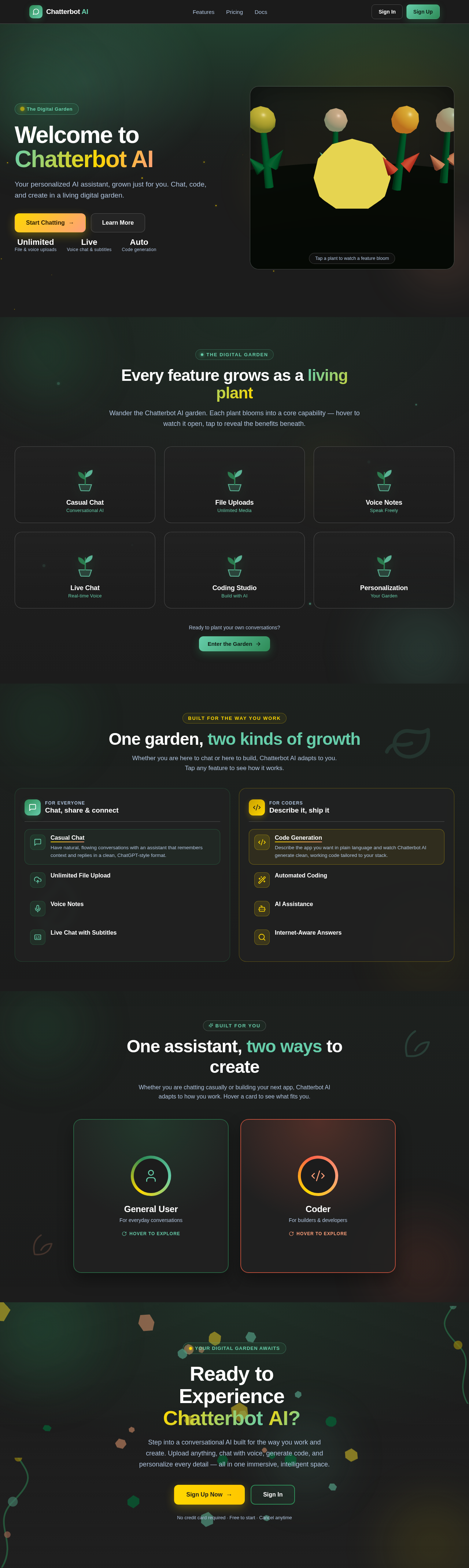
Welcome to Chatterbot AI
Your personalized AI assistant, grown just for you. Chat, code, and create in a living digital garden.
Every feature grows as a living plant
Wander the Chatterbot AI garden. Each plant blooms into a core capability — hover to watch it open, tap to reveal the benefits beneath.
Ready to plant your own conversations?
Enter the GardenOne garden, two kinds of growth
Whether you are here to chat or here to build, Chatterbot AI adapts to you. Tap any feature to see how it works.
One assistant, two ways to create
Whether you are chatting casually or building your next app, Chatterbot AI adapts to how you work. Hover a card to see what fits you.
General User
For everyday conversations
Hover to exploreYour personal AI companion for casual chats, research, and everyday assistance — with unlimited uploads and natural voice interaction.
- Unlimited file, photo & video uploads
- Voice notes and live voice chat
- Personalized prompts & custom themes
- Full searchable chat history
Coder
For builders & developers
Hover to exploreDescribe what you want to build and let Chatterbot AI generate clean, ready-to-use code automatically — then review and ship.
- Automated code generation from prompts
- Describe an app, get working code
- Internet-powered, up-to-date answers
- Review, refine & implement in flow
ReadytoExperienceChatterbotAI?
Step into a conversational AI built for the way you work and create. Upload anything, chat with voice, generate code, and personalize every detail — all in one immersive, intelligent space.
No credit card required · Free to start · Cancel anytime
No comments yet. Be the first!