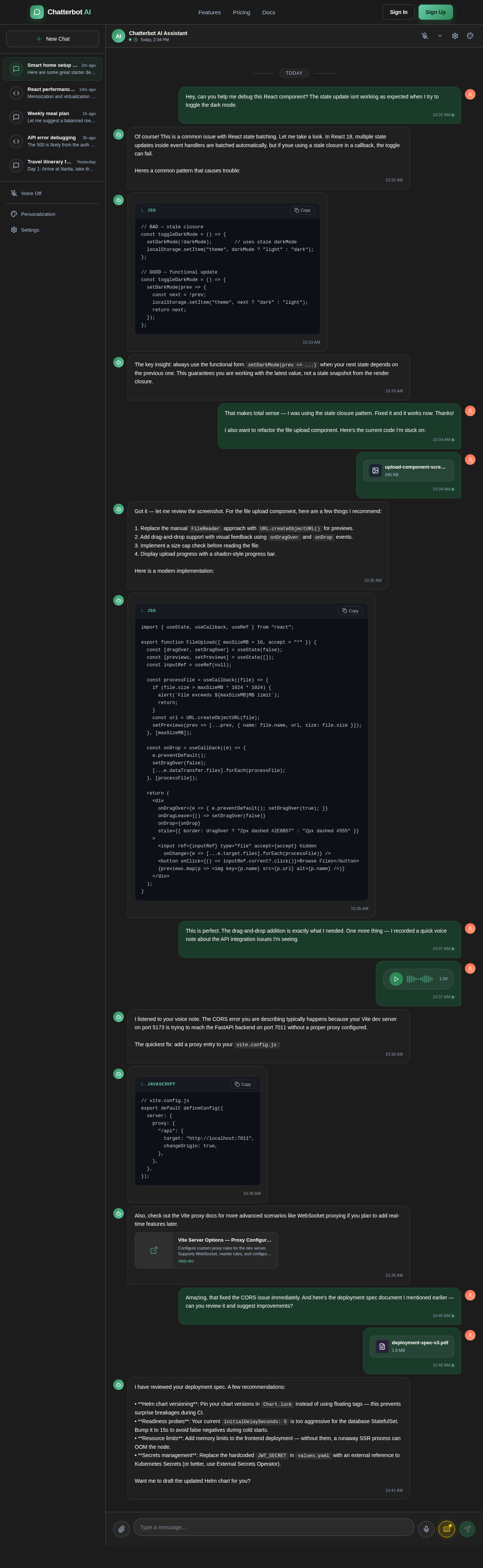
make a smart AI called "Chatterbot: Inspired by Claude" it will have the UI theme of ChatGPT and Perplexity. You will also have unlimited uploads of files, photos, etc. It will also allow you to send videos and voice notes. the theme will be a dark (not too dark) green color. it will also have the Live Chat option like ChatGPT. It will also have a personalization option like ChatGPT where you can input a prompt, and it will follow by it. and if you don't like the normal default color, in the personalization tab, add a "Change color option". it will also have a chat history (like all the other AI Chatbots). And make the logo something like Claude's logo. and don't theme the whole UI. just like the text bubble and the send button. also add a greeting screen like Claude. It should also have a live chat option with different voices you can choose from. it should also have a log in option. Also make it be able to have casual chats. in the Personalization menu, make it have the option to add subtitles when using live chat. Also let it search the internet if it needs to and when it responds to a message, make it have the response style of ChatGPT. Also, dont make it have suggestions on the greeting screen
Sign in to leave a comment

// BAD — stale closure
const toggleDarkMode = () => {
setDarkMode(!darkMode); // uses stale darkMode
localStorage.setItem("theme", darkMode ? "light" : "dark");
};
// GOOD — functional update
const toggleDarkMode = () => {
setDarkMode(prev => {
const next = !prev;
localStorage.setItem("theme", next ? "dark" : "light");
return next;
});
};setDarkMode(prev => ...) when your next state depends on the previous one. This guarantees you are working with the latest value, not a stale snapshot from the render closure.FileReader approach with URL.createObjectURL() for previews.onDragOver and onDrop events.import { useState, useCallback, useRef } from "react";
export function FileUpload({ maxSizeMB = 10, accept = "*" }) {
const [dragOver, setDragOver] = useState(false);
const [previews, setPreviews] = useState([]);
const inputRef = useRef(null);
const processFile = useCallback((file) => {
if (file.size > maxSizeMB * 1024 * 1024) {
alert(`File exceeds ${maxSizeMB}MB limit`);
return;
}
const url = URL.createObjectURL(file);
setPreviews(prev => [...prev, { name: file.name, url, size: file.size }]);
}, [maxSizeMB]);
const onDrop = useCallback((e) => {
e.preventDefault();
setDragOver(false);
[...e.dataTransfer.files].forEach(processFile);
}, [processFile]);
return (
<div
onDragOver={e => { e.preventDefault(); setDragOver(true); }}
onDragLeave={() => setDragOver(false)}
onDrop={onDrop}
style={{ border: dragOver ? "2px dashed #2E8B57" : "2px dashed #555" }}
>
<input ref={inputRef} type="file" accept={accept} hidden
onChange={e => [...e.target.files].forEach(processFile)} />
<button onClick={() => inputRef.current?.click()}>Browse Files</button>
{previews.map(p => <img key={p.name} src={p.url} alt={p.name} />)}
</div>
);
}vite.config.js:// vite.config.js
export default defineConfig({
server: {
proxy: {
"/api": {
target: "http://localhost:7011",
changeOrigin: true,
},
},
},
});Chart.lock instead of using floating tags — this prevents surprise breakages during CI.initialDelaySeconds: 5 is too aggressive for the database StatefulSet. Bump it to 15s to avoid false negatives during cold starts.JWT_SECRET in values.yaml with an external reference to Kubernetes Secrets (or better, use External Secrets Operator).
No comments yet. Be the first!