
Try Before You Buy
Test any club on our live driving range before you commit. Feel the swing, see the flight, then take it home.
"CNY Golf Shop & Range" website with a premium, modern retail feel. -------------------------------------------------- IMAGE IMPROVEMENTS -------------------------------------------------- 1. Rainbow Image (Hero): - Improve visual quality using: - Higher contrast - Slight vibrance boost - Sharpening effect - Ensure image is: - Centered on mobile - Properly cropped (focus on rainbow + range) - No stretching - Add a dark gradient overlay (top → bottom) for readability CSS example: background: linear-gradient(rgba(0,0,0,0.45), rgba(0,0,0,0.6)), url('hero.jpg'); -------------------------------------------------- HEADER / LOGO FIX -------------------------------------------------- - Replace the current green "CNY" text with their actual logo image - Logo should: - Be left aligned - Max-height: 50px on desktop, 40px on mobile - Keep text fallback next to logo: "CNY Golf Shop & Range" -------------------------------------------------- PRO SHOP PAGE (MAJOR REDESIGN - MAIN FOCUS) -------------------------------------------------- THIS PAGE SHOULD FEEL LIKE: → A MODERN SHOPPING WEBSITE (Nike, PGA Store, etc.) Remove: - Old banner image - Any generic sections Replace with: 1. Clean Shop Header - Title: "Shop Clubs & Gear" - Subtitle: "New, used, and trade-in options available" 2. FILTER BAR (top of section) - Buttons: - All - Drivers - Irons - Wedges - Putters - Bags - Horizontal scroll on mobile 3. PRODUCT GRID (MAIN FEATURE) - Grid layout: - Mobile: 1 column - Tablet: 2 columns - Desktop: 3–4 columns Each product card includes: - Image - Club name (ex: "Callaway Rogue Driver") - Condition label (New / Used / Trade-In) - Price (or "In Store") - Small badge (Used Deal, Featured, etc.) - Hover effect (scale + shadow) 4. PRODUCT CAROUSEL (Featured Items) - Horizontal scrolling carousel - Snap scrolling on mobile - Show: - “Featured Clubs” - “Best Deals” 5. CARD DESIGN STYLE - White background - Rounded corners (2xl) - Subtle shadow - Clean spacing - No clutter -------------------------------------------------- IMAGES FOR PRO SHOP -------------------------------------------------- - Use high-quality stock golf club images (drivers, irons, etc.) - Make sure: - Bright, clean background - Consistent style - No low-quality images -------------------------------------------------- DRIVING RANGE PAGE (KEEP SIMPLE) -------------------------------------------------- - Keep clean layout - Use real images - Add slight polish: - Cards - Icons - Better spacing -------------------------------------------------- MOBILE EXPERIENCE (TOP PRIORITY) -------------------------------------------------- - All shop cards stack vertically - Carousel scrolls naturally with finger swipe - Buttons are full width - Filter bar becomes scrollable row - Text is large and readable -------------------------------------------------- VISUAL POLISH -------------------------------------------------- - Add: - Hover scaling on cards - Smooth transitions (0.2s ease) - Consistent padding (p-4 / p-6) - Section spacing (py-12+) - Remove: - Anything that feels like a template - Overuse of borders - Cluttered sections -------------------------------------------------- GOAL -------------------------------------------------- The site should feel like: → A real golf retail store → Clean, modern, local but premium → Focused on selling clubs first The Pro Shop page should immediately stand out as the most important part of the site.


Sign in to leave a comment
As a frontend developer, implement the CTASection for the Landing page. This section renders a `<section className='ct-section'>` containing a `ct-card` div with a decorative `ct-glow` aria-hidden overlay and `ct-content` block. The content includes an h2 headline ('Come swing with us in Central New York'), a descriptive paragraph, and a `ct-actions` div with two anchor links: a primary CTA button (`ct-btn--primary`) linking to /ProShop and a ghost button (`ct-btn--ghost`) linking to /DrivingRange. No state hooks are used. Apply CTASection.css styles for card glow effect and button variants.
As a frontend developer, implement the Navbar for the Landing page. This component may already exist from a previous page. It uses `useState(false)` to manage mobile menu open/close state (`open`). It renders a `<header className='nv-header'>` with a `nv-inner` div containing: a brand anchor (`nv-brand`) with an Unsplash logo image (`photo-1535131749006`, 120x120) and stacked brand text spans (`nv-brand-top`, `nv-brand-sub`); a `<nav>` with dynamic class `nv-links--open` when `open` is true, mapping over a `links` array (Landing, ProShop, DrivingRange) to render `nv-link` anchors that call `setOpen(false)` on click, plus a 'Shop Now' CTA anchor; and a `<button className='nv-burger'>` that toggles `open` state, with three `nv-burger-bar` spans that receive modifier classes when open. Apply the 3402-char Navbar.css for responsive layout and burger animation.
As a backend developer, define SQLAlchemy ORM models and Alembic migrations for the MySQL database. Models required: Product (id, name, slug, category, condition, price, image_url, rating, review_count, badges JSON, description, is_featured, created_at), RangePricingTier (id, name, price, period, features JSON, is_popular, savings_label), RangeService (id, title, description, icon_name, display_order), FacilityHighlight (id, title, description, image_url, display_order). Create initial migration and seed script populating all static data defined in the frontend section tasks (12 products, 3 pricing tiers, range services, facility highlights).
As a backend developer, configure the FastAPI application entrypoint (main.py): set up CORS middleware to allow the React frontend origin, configure exception handlers, add a health-check endpoint GET /api/health, and establish the router registration pattern for all resource routers (products, range). Set environment-driven configuration (DATABASE_URL, CORS_ORIGINS, ENV) using pydantic-settings. This is a prerequisite for all backend API tasks.
As a frontend developer, establish the global design system and theme configuration for the CNY Golf site. Create a central CSS variables file (tokens.css or variables.css) defining all color tokens from the SRD: --color-primary: #2E8B57, --color-primary-light: #66CDAA, --color-secondary: #FFD700, --color-accent: #FF4500, --color-highlight: #FFA500, --color-bg: #F5F5F5, --color-surface: rgba(255,255,255,0.9), --color-text: #333333, --color-text-muted: #777777, --color-border: rgba(0,0,0,0.1). Also define global typography scale, spacing utilities, transition defaults (0.2s ease), and breakpoint variables (mobile/tablet/desktop). Import this into the root App CSS so all section components inherit tokens. This ensures visual consistency across Landing, ProShop, and DrivingRange pages.
As a frontend developer, implement the FeaturesSection for the Landing page. This section renders a `<section className='ft-section'>` with a `ft-head` block containing an eyebrow span ('Why CNY Golf'), an h2 title, and a lead paragraph. Below that, a `ft-grid` div maps over the static `FEATURES` array (4 items with icon emoji, title, and desc fields) to render `<article className='ft-card'>` elements, each containing a `ft-icon` span, `ft-card-title` h3, and `ft-card-desc` paragraph. No state hooks. Apply FeaturesSection.css for grid layout and card styles.
As a frontend developer, implement the Footer for the Landing page. This component may already exist from a previous page. It renders a `<footer className='ft-foot'>` with a `ft-foot-inner` containing three columns: brand block (`ft-foot-brand`) with logo text 'CNY GOLF', tagline, and blurb; an 'Explore' column (`ft-foot-col`) that maps over a `pages` array (Landing, ProShop, DrivingRange) to render `ft-foot-link` anchors; and a 'Visit Us' column with static info spans. A `ft-foot-bottom` div renders copyright and 'Built for golfers' text. No state hooks. Apply Footer.css for layout and brand styles.
As a frontend developer, implement the HeroSection for the Landing page. This section renders a `<section className='hr-section'>` with a full-bleed `hr-bg` div containing an Unsplash background image (`photo-1587174486073`, 1600x1000) and an `hr-overlay` gradient. The `hr-content` block includes a badge span, an h1 with accent span (`hr-title-accent`), a sub paragraph with a `<strong>` 'try before you buy' callout, an `hr-actions` div with primary (`hr-btn--primary`) and ghost (`hr-btn--ghost`) anchor links, and an `hr-meta` div rendering three stat items (300+ clubs, 365 days, Try) separated by `hr-meta-divider` spans. A scroll indicator (`hr-scroll`) with text and animated line is included. No state hooks. Apply the 4178-char HeroSection.css for layout, overlay, and scroll animation.
As a frontend developer, implement the ProShopPreview section for the Landing page. This section uses `useState('All')` to track the active category filter. It renders a `<section className='ps-section' id='proshop'>` with: a `ps-head` block containing eyebrow text, h2 title, and a 'View full Pro Shop →' anchor; a `ps-filters` div with `role='tablist'` mapping over `CATEGORIES` array ('All', 'Drivers', 'Irons', 'Putters', 'Wedges', 'Beginner', 'Apparel') to render filter chip buttons (`ps-chip`, `ps-chip--active` for active), each calling `setActive(c)` on click; and a `ps-grid` div mapping over the filtered `visible` products (derived from the 6-item `PRODUCTS` array filtered by `active` category) to render `<article className='ps-card'>` elements with product image (`ps-card-img`), category badge (`ps-card-cat`), product name h3, condition/price meta row, and a 'View Details' anchor linking to /ProShop. Apply the 3812-char ProShopPreview.css for grid, card hover effects, and chip states.
As a frontend developer, implement the RangeSection for the Landing page. This section renders a `<section className='rg-section' id='range'>` with an `rg-inner` two-column layout. The left `rg-media` div contains two stacked Unsplash images: a main image (`rg-img--main`, photo-1632946180349, 900x700) and an inset image (`rg-img--inset`, photo-1593111774240, 500x500). The right `rg-content` div contains an eyebrow span, h2 title ('Hit a bucket, then take it home'), lead paragraph, and an `rg-list` ul mapping over the `PERKS` array (4 items using `dangerouslySetInnerHTML` for HTML entity rendering) to render `rg-list-item` li elements with a checkmark span and content. A 'Explore the Range & Services' anchor button (`rg-btn`) links to /DrivingRange. No state hooks. Apply RangeSection.css for the two-column media/content layout.
As a frontend developer, implement the StatsSection for the Landing page. This section renders a `<section className='st-section'>` with an `st-inner` div mapping over a static `STATS` array (4 items: '2024' / Established, '300+' / Clubs & Items in Stock, '12' / Practice Bays, '365' / Days Open Per Year) to render `st-item` divs each containing a `st-num` span and a `st-label` span using `dangerouslySetInnerHTML` to handle HTML entity in 'Clubs & Items in Stock'. No state hooks or interactivity. Apply StatsSection.css for the horizontal stat display layout.
As a frontend developer, implement the Navbar section for the ProShop page. This component uses a useState hook (`open`) to toggle a mobile burger menu. It renders an `nv-header` with an `nv-inner` container holding: a brand link with an Unsplash logo image (`nv-brand-img`) and stacked text spans (`nv-brand-top`, `nv-brand-sub`); a nav element (`nv-links`, `nv-links--open` when open) mapping over 3 links (Landing, ProShop, DrivingRange) plus a 'Shop Now' CTA anchor; and a burger button with 3 `nv-burger-bar` spans that receive active class modifiers (`nv-burger-bar--1/2/3`) when open. Note: this component likely already exists from the Landing page (task 8e8f44d0-e9b3-437f-a8a5-cfaf2d2f47f9) — reuse if available, otherwise implement from Navbar.css (3398 chars).
As a backend developer, implement FastAPI endpoints for the products resource: GET /api/products (list with optional query params: category, sort, search, limit, offset), GET /api/products/{id} (single product detail). Each product should include: id, name, category, condition (New/Used/Trade-In), price, image_url, rating, review_count, badges (e.g. Featured, Best Deal), and description. Seed the database with the 12 products defined in ProShopGrid and the 5 featured products in ProShopFeatured. Note: frontend tasks 21fefc0d, 7d422c27, 848c5054, 3193e771, e68ecea6 depend on this API.
As a backend developer, implement FastAPI endpoints for driving range data: GET /api/range/pricing (returns TIERS array: Daily Pass $15, 10-Visit Punch Card $120, Monthly Unlimited $99 with feature flags), GET /api/range/services (returns services list with icons, titles, descriptions used by RangeServices), GET /api/range/facilities (returns facility highlights used by FacilityHighlights). Note: frontend tasks 7fd687ba, 4ba7200d, 45655ed9 depend on this API.
As a frontend developer, create a centralized API service layer (e.g. src/services/api.js or api.ts) using fetch or axios to communicate with the FastAPI backend. Implement functions: fetchProducts({ category, sort, search }), fetchProductById(id), fetchRangePricing(), fetchRangeServices(), fetchFacilityHighlights(). Configure the base URL from an environment variable (REACT_APP_API_URL). Add error handling and loading state patterns. This service layer decouples the frontend components from direct fetch calls and should be used by ProShopGrid, ProShopFeatured, ProShopFilter, ProShopDeals, PricingTiers, RangeServices, and FacilityHighlights sections.
As a frontend developer, implement the ProShopHero section for the ProShop page. This section renders a full-bleed hero (`psh-hero`) with a background Unsplash image (1600x900, golf course golden hour) behind a `psh-bg-overlay` div. A `psh-canvas` div hosts a React Three Fiber `Canvas` (camera at [0,0,6], fov 50, dpr [1,2], alpha true) rendering a `Scene3D` component with ambient light, directional light, and two point lights (gold #FFD700 and teal #66CDAA). `Scene3D` renders 5 `GolfBall` sub-components each using `@react-three/drei` `Float` wrapping a `Sphere` (args [1,64,64]) with `meshStandardMaterial` (varying white/off-white colors, roughness 0.35–0.44, metalness 0.04). Content layer (`psh-content`) includes breadcrumb links (CNY GOLF / Pro Shop), an h1 with `psh-title-accent` span, and a subtitle paragraph. Requires `@react-three/fiber` and `@react-three/drei` dependencies.
As a frontend developer, implement the ProShopFilter section for the ProShop page. This component manages 5 state hooks: `activeCat` (default 'all'), `searchQuery`, `sortBy` (default 'featured'), `magnet` (for magnetic button hover effect), and `appliedTags` array. It renders a `pf-root` container with: a decorative `pf-three-accent` hosting a React Three Fiber `Canvas` (camera [0,0,2.7], fov 42) with a `GolfBallScene` that uses `useFrame` to auto-rotate a sphere mesh (y += delta*0.9, x += delta*0.15). Category buttons map over 7 items (All Clubs/142, Drivers/28, Irons/36, Wedges/22, Putters/18, Gear/24, Balls/14) with magnetic hover via `handleMouseMove`/`handleMouseLeave` using `useCallback` and `getBoundingClientRect`. A search input uses lucide-react `Search` and `X` icons. A sort dropdown maps 4 `sortOptions`. Applied tags render as removable chips via `removeTag`. `clearAll` resets all state. A result count display shows the active category's count.
As a frontend developer, implement the ProShopFeatured section for the ProShop page. This component implements a 3D circular carousel using React Three Fiber with 5 product cards (TaylorMade Stealth 2 Driver $599.99, Callaway Paradym Irons $899.99, Titleist Pro V1x $54.99, Ping G430 Fairway $349.99, Scotty Cameron Phantom $429.99). Constants define CARD_WIDTH=1.8, CARD_HEIGHT=2.4, RADIUS=4.2, ANGLE_STEP=(PI*2)/5, LERP_SPEED=0.07, AUTO_ADVANCE_MS=5000. `Card3D` component uses `@react-three/drei` `RoundedBox` for card body, gold accent bar, and icon square — active card uses white/roughness 0.22/emissive green vs inactive #ececec/roughness 0.48. `CarouselScene` uses `useRef` groupRef and `useFrame` to lerp `groupRef.rotation.y` toward `rotationRef.current` at LERP_SPEED. Auto-advance uses `useEffect` with 5000ms `setInterval`. Navigation prev/next buttons update `activeIndex` state and `rotationRef`. Product info panel renders name, condition badge, price, and 'View Item' CTA for the active product. Imports `THREE` from three for `MathUtils.lerp`.
As a frontend developer, implement the ProShopDeals section for the ProShop page. This component features a `useCountdown` custom hook that accepts a `targetDate`, calculates `{ d, h, m, s, expired }` via `useCallback`, and updates every 1000ms via `useEffect`/`setInterval`. A `pad(n)` utility zero-pads digits. The 3D scene (`DealScene`) uses a `mouseRef` for parallax: `useFrame` rotates `groupRef.rotation.y` by +0.0015 per frame plus mouse-driven tilt clamped via `THREE.MathUtils.clamp` to ±0.28 on x-axis. `useMemo` defines 4 `dealSpheres` with positions/colors (red #FF4500, orange #FFA500, gold #FFD700, teal #66CDAA). The scene includes a central `Float`-wrapped golf ball sphere (size 0.7, roughness 0.25) with a green emissive torus ring, an outer gold torus ring at PI/3 rotation with 0.7 opacity, and 4 orbiting `Float` deal spheres. The UI section renders a countdown timer displaying days/hours/minutes/seconds with `pad()`, deal product cards with discount badges, and a 'Shop Deals' CTA. Imports `Float` from `@react-three/drei` and `THREE` from `three`.
As a frontend developer, implement the ProShopCTA section for the ProShop page. Note: the JSX provided for this section is actually the Footer component (`ft-foot` classes, Footer.css) — it appears to be a shared Footer reused as the CTA placement. It renders a `ft-foot` footer with an `ft-foot-inner` flex container holding: a brand block with `ft-foot-logo` span ('CNY GOLF'), `ft-foot-tag` span ('Shop & Range · Try Before You Buy'), and a blurb paragraph. Two `ft-foot-col` divs render 'Explore' links (Landing, ProShop, DrivingRange mapped via `pages` array) and 'Visit Us' info (Cicero Central New York, Open Year Round, Established 2024). A `ft-foot-bottom` bar shows copyright and 'Built for golfers, by golfers.' text. This component may already exist from Landing page (task a8f18664-c979-4662-a9a7-531c82d3d0e4) — reuse the Footer component if available rather than duplicating.
As a frontend developer, implement the Footer section for the ProShop page. This renders the shared `Footer` component using `ft-foot` CSS classes from Footer.css (1428 chars). The footer contains an `ft-foot-inner` flex layout with three columns: a brand block (`ft-foot-logo` 'CNY GOLF', `ft-foot-tag` 'Shop & Range · Try Before You Buy', blurb paragraph about year-round Central New York location); an 'Explore' column mapping a `pages` array of 3 links (Landing /Landing, ProShop /ProShop, DrivingRange /DrivingRange) rendered as `ft-foot-link` anchors; and a 'Visit Us' column with three `ft-foot-info` spans (Cicero Central New York, Open Year Round, Established 2024). A `ft-foot-bottom` bar renders copyright '© 2026 CNY Golf Shop & Range' and tagline. Note: this component very likely already exists from Landing page implementation (task a8f18664-c979-4662-a9a7-531c82d3d0e4) — confirm reuse before reimplementing.
As a frontend developer, implement the DrivingRangeHero section for the DrivingRange page. This section uses @react-three/fiber Canvas with a mouse-reactive 3D golf ball. The GolfBall sub-component uses useRef for meshRef and currentRot (THREE.Vector2), and useFrame to lerp rotation toward mouseTarget with factor 2.5*delta — rotating on Y (mouseTarget.x * PI * 0.4) and X (mouseTarget.y * PI * 0.25). The parent DrivingRangeHero uses sectionRef (for getBoundingClientRect) and mouseTarget ref (normalized -1 to 1 coords), with a handleMouseMove useCallback that computes normalized mouse position. The JSX renders: a background section (dhr-section) with an Unsplash driving range image (w=1600) inside dhr-bg with dhr-overlay, a dhr-rainbow decorative div, a dhr-3d-container with Canvas (camera pos [0,0,3.5] fov=42, alpha=true), ambient + 2 directional + 1 gold point light, and GolfBall. Content area includes a dhr-badge span, h1 with dhr-title and dhr-title-accent span, a paragraph, and dhr-actions with two anchor CTAs ('Book a Bay' → #book, second → #pricing). Requires @react-three/fiber, three.js. CSS is 5532 chars.
As a frontend developer, implement the RangeOverview section for the DrivingRange page. This section uses framer-motion and @react-three/fiber with three distinct 3D scenes wrapped in Suspense. It defines: (1) RotatingGolfBall using useFrame to auto-rotate Y (delta * (hovered ? 1.8 : 0.45)) and X (delta * 0.15), wrapped in GolfBallScene Canvas; (2) RotatingTeeAndBall group with cone geometry (tee) and sphere (ball on top), rotating Y based on hover; (3) RotatingFlagPin group with cylinder (pole), box (flag that changes color to #FF4500 when hovered vs #2E8B57), and sphere (base), rotating Y based on hover. The parent section uses useState for hover state on each card, and framer-motion for scroll-reveal animations. All three scenes use useRef for groupRef and useFrame for animation loops. CSS is 3487 chars.
As a frontend developer, implement the FacilityHighlights section for the DrivingRange page. This section features a cursor-reactive 3D golf ball scene using @react-three/fiber, @react-three/drei (Float, Sphere, Environment), and THREE.js. GolfBallMesh uses useRef for groupRef and currentRot (THREE.Vector2), with useFrame lerping rotation toward mouseTarget (factor 0.06) — rotating Y by currentRot.x * 1.8 and X by currentRot.y * 0.9. It renders: a Float-wrapped Sphere (golf ball, roughness 0.28) with a semi-transparent overlay Sphere for dimple effect (opacity 0.12), a cylinder tee mesh in #e85d3a below, and a circle ground disc in green (#2E8B57 * 0.5, opacity 0.35). GolfBallScene adds a global pointermove listener via useEffect to update mouseTarget, uses Environment preset='sunset'. A custom useScrollReveal hook (threshold=0.1) drives reveal animations. Lighting: ambient 0.55, directional from [4,6,3] white + [-2,1,-2] gold, point light #66CDAA. CSS is 5064 chars.
As a frontend developer, implement the RangeServices section for the DrivingRange page. This section uses @react-three/fiber, THREE.js, and lucide-react icons (Target, ShoppingBag, GraduationCap, Users, Trophy, Crosshair, ArrowRight). It features: a useDimpleTexture hook (useMemo) that programmatically generates a 128x128 canvas texture with hexagonal-offset dimple pattern (spacing=9, radius=3.2, rgba(0,0,0,0.07) circles) converted to THREE.CanvasTexture with RepeatWrapping and SRGBColorSpace. GolfBall component receives position, scale, speed, mouseRef, and dimpleTex props — uses useFrame to animate floating motion with sin/cos on x/y/z axes plus mouse influence (mx * 0.35, my * -0.28) and continuous rotation on x/y axes; applies bumpMap with bumpScale=0.02. Tee component similarly floats based on sin/cos with mouse influence. Service cards use the lucide-react icons. CSS is 5108 chars.
As a frontend developer, implement the PricingTiers section for the DrivingRange page. This section renders a TIERS array of 3 pricing objects (Daily Pass $15/day, 10-Visit Punch Card $120/10 visits with 'Save $30' savings badge, Monthly Unlimited $99/month marked popular:true) each with feature arrays of 7 items using included boolean flags. A custom CheckIcon SVG component renders a checkmark polyline. GolfBall3D uses @react-three/fiber Canvas (camera [0,0.25,2.8] fov=45) with @react-three/drei Float (speed=1.8, rotationIntensity=0.55, floatIntensity=0.5) wrapping a sphere mesh (args [0.7,64,64], white, roughness=0.34, metalness=0.06), ambient light 0.5, directional from [5,8,5] at 0.85, gold point light at [-3,2,3]. Uses useState and useEffect for animated counter/entry effects, useRef for scroll intersection. The popular tier card receives distinct visual treatment. CSS is 6266 chars.
As a frontend developer, implement the BookingCTA section for the DrivingRange page. This section features a rich 3D scene via @react-three/fiber with multiple animated components: GolfBall (meshRef, useFrame rotating Y at delta*0.35 and X at delta*0.12, sphereGeometry args [1.25,72,72], roughness=0.18); OrbitingParticle (radius, speed, size, color, phase props — useFrame computing position via cos/sin on elapsed time + phase for X/Z, and sin with 1.6x speed for Y); TeeMarker (group at [2.8,-1.6,-1], rotating Y at delta*0.25, containing a disk cylinder in #FF4500 and a pole cylinder in #f5f5f0). GolfBallScene composes all elements with a particles array of 8 items (4 gold #FFD700 at radius 2.0, 4 green #66CDAA at radius 2.5) passed as OrbitingParticle instances. Canvas uses camera [0,0.2,5.5] fov=42, transparent background. The CTA section uses useState and useEffect for scroll-triggered reveal. CSS is 4246 chars.
As a frontend developer, implement the Footer section for the DrivingRange page. This is a static functional component rendering a footer with class 'ft-foot'. It contains an 'ft-foot-inner' div with three columns: (1) brand column with 'CNY GOLF' logo span, tagline 'Shop & Range · Try Before You Buy', and a blurb paragraph; (2) Explore column (ft-foot-col) with h4 and 3 navigation links (Landing /Landing, ProShop /ProShop, DrivingRange /DrivingRange) mapped from a pages array using ft-foot-link class; (3) Visit Us column with 3 ft-foot-info spans (Cicero Central New York, Open Year Round, Established 2024). A ft-foot-bottom div shows copyright '© 2026 CNY Golf Shop & Range' and 'Built for golfers, by golfers.' span. Note: This component likely already exists from the Landing page (task a8f18664-c979-4662-a9a7-531c82d3d0e4) and should be reused/verified. CSS is 1428 chars.
As a Tech Lead, verify the end-to-end integration between the ProShop products frontend implementation and the Products backend API. Ensure the ProShopGrid fetches products from GET /api/products and renders them correctly, the ProShopFilter category buttons pass the correct query params, the ProShopFeatured carousel loads featured products from the API, and the ProShopDeals section fetches deal products. Confirm API responses map to component props without errors, loading and error states are handled gracefully, and all product data (name, condition, price, badges, rating) displays correctly in the UI. Note: depends on frontend tasks 21fefc0d (ProShopGrid), 7d422c27 (ProShopFeatured), 848c5054 (ProShopFilter), 3193e771 (ProShopDeals) and backend task temp_backend_products_api.
As a Tech Lead, verify the end-to-end integration between the DrivingRange frontend implementation and the Driving Range backend API. Ensure the PricingTiers section fetches tier data from GET /api/range/pricing and renders all three tiers with correct prices, feature flags, and popular badge. Verify RangeServices loads service cards from GET /api/range/services with correct icons and descriptions. Confirm FacilityHighlights loads from GET /api/range/facilities. Validate loading states, error handling, and mobile responsiveness across all range sections. Note: depends on frontend tasks 7fd687ba (PricingTiers), 4ba7200d (RangeServices), 45655ed9 (FacilityHighlights) and backend task temp_backend_range_api.
As a frontend developer, implement the ProShopGrid section for the ProShop page. This component renders a 12-product grid using a PRODUCTS array with items including Titleist TSR2 Driver ($399.99, 4.8★/27 reviews), Callaway Paradym Irons ($699.99), TaylorMade Stealth 2 Fairway ($249.99), Ping G430 Hybrid ($279.99), Scotty Cameron Newport 2 ($349.99), Titleist Vokey SM9 Wedge ($159.99), Callaway Chrome Soft Balls ($49.99), TaylorMade Spider GT Putter ($219.99), Titleist Pro V1 12pk ($54.99), Ping G425 Max Driver ($329.99), Cobra LTDx Irons ($579.99), Mizuno JPX923 Hot Metal ($499.99) — each with Unsplash product images (600x450). State hooks manage hover and possibly view toggle. A React Three Fiber `Canvas` with `useFrame` adds a decorative 3D element. Each product card displays: Unsplash image, condition badge, product name, star rating with review count, price, and an 'Add to Cart' or 'View' CTA. `useRef` and `useCallback` are used for hover interaction logic. Grid uses CSS Grid via `ProShopGrid.css` (9249 chars) for responsive layout.
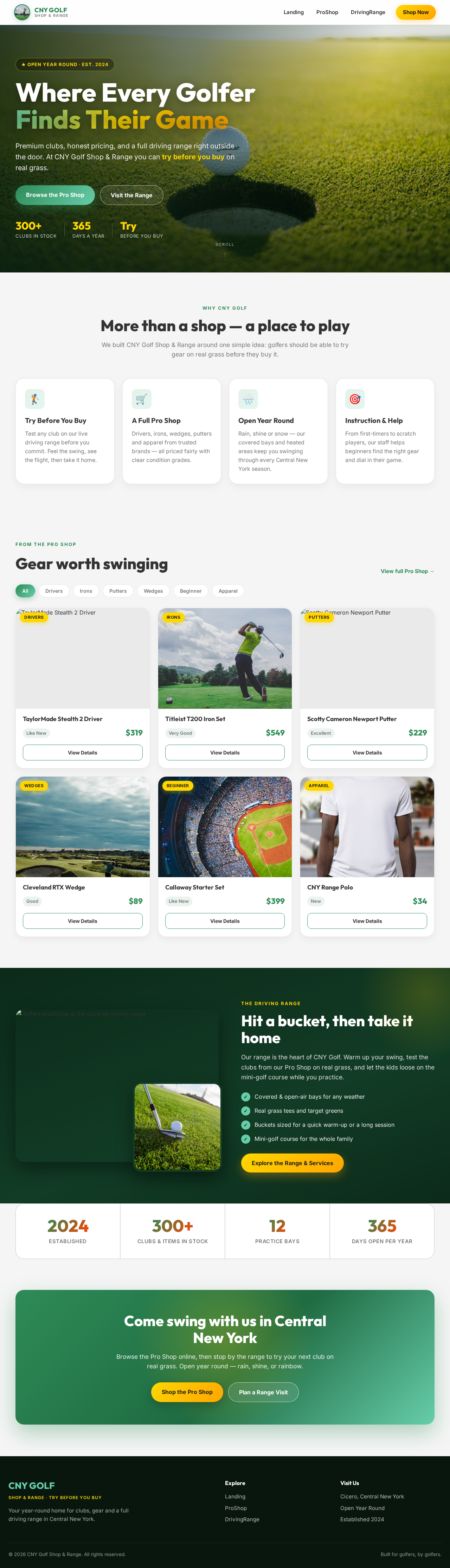

Premium clubs, honest pricing, and a full driving range right outside the door. At CNY Golf Shop & Range you can try before you buy on real grass.
We built CNY Golf Shop & Range around one simple idea: golfers should be able to try gear on real grass before they buy it.
Test any club on our live driving range before you commit. Feel the swing, see the flight, then take it home.
Drivers, irons, wedges, putters and apparel from trusted brands — all priced fairly with clear condition grades.
Rain, shine or snow — our covered bays and heated areas keep you swinging through every Central New York season.
From first-timers to scratch players, our staff helps beginners find the right gear and dial in their game.
 Drivers
 Irons
Irons Putters
 Wedges
 Beginner
 Apparel

Our range is the heart of CNY Golf. Warm up your swing, test the clubs from our Pro Shop on real grass, and let the kids loose on the mini-golf course while you practice.
Browse the Pro Shop online, then stop by the range to try your next club on real grass. Open year round — rain, shine, or rainbow.
No comments yet. Be the first!