BOM V2
 Surya Prakash Guna Sekhar
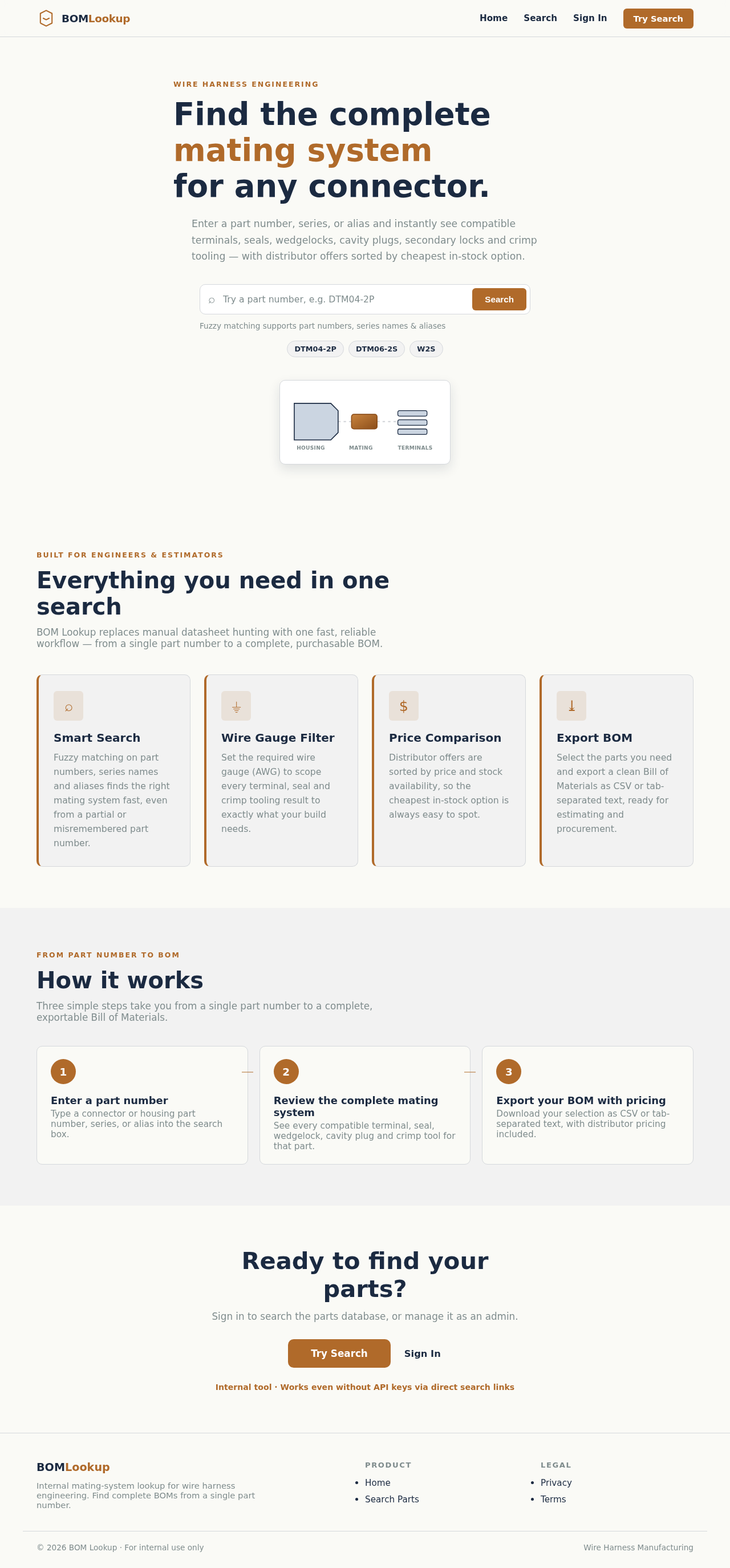
MateFinder v2 Build Prompt for 8080.ai — Fresh Project Paste everything below the line as the project prompt for a NEW project. This version bakes in every correction from the first attempt so the requirements, flows, and pages generate correctly on the first pass. Build a production-grade internal web application called BOM Lookup for a wire harness manufacturer. Its purpose: when an engineer or estimator enters a connector or housing part number, the app instantly returns the complete mating system for that part — the mating connector, compatible terminals (filtered by wire gauge), seals/cavity plugs, wedgelock/secondary lock, and recommended crimp tooling — each with direct purchase links to distributors, sorted with the cheapest in-stock option first. This replaces manually Googling mating parts one at a time. Personas — EXACTLY TWO. Do not create any others. User: engineer/estimator. Searches parts, views results, exports BOMs. Admin: everything User does, plus manages the database. Do NOT create personas such as Inventory Manager, Operations Manager, Procurement Specialist, or Data Analyst. Do not create user flows or pages for any persona other than User and Admin. Pages — EXACTLY THESE EIGHT. Do not create any others. Landing Login Search Results Admin Dashboard Admin Parts Admin Flags Admin Reports There is no user-facing Dashboard page, no SearchLog page, no standalone Parts page, no MatingMap page, and no DistributorOffers page. Search-log reporting lives inside Admin Reports. The mating map is a database table, not a page or visual diagram tool. Distributor offers render inside the Results page. Core user flow User types a manufacturer part number (e.g. "DT06-12S") into a single prominent search box. Search must be fuzzy/typo-tolerant, matching part number, series name, and aliases. User optionally sets: required quantity (default 100) and wire gauge (AWG). Results page shows the queried part pinned at top (qty and wire gauge still editable), then grouped sections in this order: Mating Connector, Terminals (filtered by wire gauge if given), Seals & Cavity Plugs, Wedgelock / Secondary Lock, Crimp Tooling. Every part in every section shows: manufacturer, part number, short description, and distributor offers — distributor name, unit price at the entered quantity, stock, and a direct product link opening in a new tab — sorted cheapest-first, out-of-stock offers greyed at the bottom of each list. Per-part checkboxes and a "Copy BOM" button exporting selected parts as CSV and tab-separated clipboard text: part number, manufacturer, description, qty, best unit price, best distributor, link. A failed search shows "Not in our database yet" with a one-click "Request this part" action that logs the query for admins. Data model (Postgres) parts: id, manufacturer, part_number (unique, indexed), description, category (housing_plug, housing_receptacle, terminal, seal, wedgelock, tool, other), series, positions, gender, wire_gauge_min, wire_gauge_max, datasheet_url, aliases (text array). mating_map: id, part_id, related_part_id, relation_type (mates_with, uses_terminal, uses_seal, uses_wedgelock, crimped_by), notes, verified (bool), created_by, created_at. This is a relational table that search traverses to assemble the grouped results. It is not a visual diagramming feature. distributor_offers (cache): part_id, distributor, sku, product_url, currency, price_breaks (JSONB), stock, fetched_at. search_log: query, matched_part_id (nullable), user_id, created_at. Used only for the Admin Reports unmatched-searches report. Distributor pricing integration Integrate the Nexar (Octopart) GraphQL API for live distributor offers (price breaks, stock, product URLs) by manufacturer part number. API token via environment variable, integration behind a clean service interface. Cache offers in distributor_offers for 24 hours; show "prices as of <time>" with a manual refresh button. Fallback mode (the app must be fully usable with zero API keys configured): without a Nexar token, each part renders working distributor search links built from the part number — Digi-Key (https://www.digikey.com/en/products/result?keywords={PN}), Mouser (https://www.mouser.com/c/?q={PN}), Newark (https://www.newark.com/search?st={PN}), Arrow (https://www.arrow.com/en/products/search?q={PN}), Waytek (https://www.waytekwire.com/search/?query={PN}) — labeled "Search on <distributor>" with no price shown. Admin area Admin Parts: CRUD for parts and mating relationships, relation picker with autocomplete, CSV bulk import for both parts and relations with downloadable templates. Admin Flags: any user can flag an incorrect mating suggestion; flags appear in a review queue with a Verify action. Admin-verified relations show a "Verified" badge in results. Admin Reports: unmatched-searches report from search_log (most-searched part numbers returning no results). This is a simple report, not an analytics suite. Admin Dashboard: simple overview (part count, relation count, pending flags, recent unmatched searches). No invented analytics, charts of user activity, or trend visualizations. Seed data (required — the app must demo with real content on first boot) Seed example parts and mating relations, all with verified=false, structured in a data file so more families can be added: Deutsch DT: DT06-2S…DT06-12S plugs mating DT04-2P…DT04-12P receptacles; size-16 terminals [phone] / [phone]–16 AWG); W2S–W12S / W2P–W12P wedgelocks; HDT-48-00 crimp tool. Deutsch DTM: DTM06-xS plugs, DTM04-xP receptacles, size-20 terminals [phone] / [phone], WM-xS / WM-xP wedgelocks. Molex MX150: example sealed housings with 33012-series terminals. TE AMPSEAL 16: example plug/cap pairs with appropriate terminals. Visual design (exact values — do not substitute) Background #FAFAF6, surface #F2F2F2, text #1B2A41 (dark navy), muted text #7F8C8D, border #D5D8DC, accent #B06A2A (copper) with #8C4E1A for hover/darker states. Copper means #B06A2A — never bright orange ( #FF6600). Part numbers and prices in a monospace font everywhere, including input placeholder text. Landing page structure, top to bottom: (1) nav — Home, Search, Sign In only; admin pages appear in navigation only after admin sign-in; (2) hero headline "Find the complete mating system" with subline and a dominant search box (placeholder: "Enter part number (e.g. DT04-2P)"); (3) a small static illustration of housing–mating–terminals; (4) a features section titled "Everything you need in one search" with four cards: Smart Search (fuzzy matching finds your connector even with partial or variant part numbers), Wire Gauge Filter (filter compatible terminals by wire gauge), Price Comparison (distributor offers sorted by cheapest in-stock first with direct purchase links), Export BOM (copy the complete bill of materials with one click); (5) CTA "Ready to find your parts?" with text "Sign in to search the parts database, or manage it as an admin." and Try Search / Sign In buttons; (6) footer with Product (Home, Search Parts) and Legal columns — admin links in the footer only for signed-in admins. Motion: minimal and functional. No looping hero animations or self-assembling component scenes. Do not add saved searches, BOM history, or any feature not listed in this prompt. Tech and quality React frontend, FastAPI backend, Postgres with Alembic migrations. RESTful API. Unit tests for mating-system assembly (given a part id, return correct grouped related parts) and offer sorting (cheapest in-stock first, out-of-stock last). All secrets via environment variables. README covering local run, Nexar token configuration, CSV bulk import, and template formats. Explicitly out of scope No purchasing/checkout in-app (links out only). No scraping of distributor sites. No public access — internal users only. No analytics dashboards. No saved searches or history features.


Comments (0)
Sign in to leave a comment
System Requirements
BOM V2 System Requirements Document
1. Introduction
The BOM V2 project aims to develop a production-grade internal web application called BOM Lookup for a wire harness manufacturer. The application will streamline the process of finding complete mating systems for connectors and housing part numbers, replacing the manual search process.
2. System Overview
BOM Lookup is designed to assist engineers and estimators in quickly finding the complete mating system for a given part number. The application will provide detailed information about mating connectors, compatible terminals, seals, cavity plugs, wedgelocks, secondary locks, and recommended crimp tooling, along with direct purchase links sorted by the cheapest in-stock option.
2a. Source Content Inventory
- Parts Database: Contains information about parts including manufacturer, part number, description, category, series, positions, gender, wire gauge range, datasheet URL, and aliases.
- Mating Map: A relational table that connects parts with their related components, detailing the type of relationship.
- Distributor Offers Cache: Stores distributor offers including part ID, distributor, SKU, product URL, currency, price breaks, stock, and fetch time.
- Search Log: Logs search queries and results for reporting purposes.
3. Functional Requirements as Story Points
- As an Engineer, I should be able to search for a part using a part number, series name, or alias with fuzzy matching.
- As an Engineer, I should be able to set the required quantity and wire gauge for my search.
- As an Engineer, I should be able to view detailed results including mating connectors, terminals, seals, wedgelocks, and crimp tooling.
- As an Engineer, I should be able to see distributor offers sorted by price and stock availability.
- As an Engineer, I should be able to export selected parts as a CSV or tab-separated text.
- As an Engineer, I should be able to request a part not found in the database.
- As an Admin, I should be able to manage parts and mating relationships with CRUD operations.
- As an Admin, I should be able to import parts and relationships via CSV.
- As an Admin, I should be able to review and verify flagged mating suggestions.
- As an Admin, I should be able to view reports of unmatched searches.
- As an Admin, I should have the database seeded on first deploy with example parts and verified=false mating relations for Deutsch DT (DT06-2S…DT06-12S / DT04-2P…DT04-12P, size-16 terminals 0462-201-16141 / 0460-202-16141, W-series wedgelocks, HDT-48-00), Deutsch DTM, Molex MX150, and TE AMPSEAL 16, structured in a data file.
4. User Personas
- User (Engineer/Estimator): Searches parts, views results, exports BOMs.
- Admin: Performs all user functions and manages the database.
5. Core User Flows
- User enters a part number in the search box -> Sets quantity and wire gauge -> Views results with grouped sections -> Selects parts and exports BOM.
- Admin logs in -> Manages parts and relationships -> Reviews flagged suggestions -> Generates unmatched search reports.
- The application consists of exactly 8 pages: Landing, Login, Search, Results, Admin Dashboard, Admin Parts, Admin Flags, Admin Reports. Results groups sections in order: Mating Connectors, Terminals, Seals, Cavity Plugs, Wedgelocks, Secondary Locks, Crimp Tooling. Flags store flagged_by and reason — there is no confidence scoring. No audit logs, no notifications, no analytics.
6. Visuals Colors and Theme
- primary: #B06A2A (Copper)
- primary_light: #8C4E1A (Darker Copper for hover states)
- secondary: #FAFAF6 (Background)
- accent: #B06A2A (Copper)
- highlight: #8C4E1A (Darker Copper)
- bg: #FAFAF6
- surface: #F2F2F2
- text: #1B2A41 (Dark Navy)
- text_muted: #7F8C8D
- border: #D5D8DC
7. Signature Design Concept
The landing hero is a dominant search box with example part-number chips and a small STATIC illustration (housing – mating – terminals) below it. This design ensures clarity and ease of use, with the search box as the focal point.
8. Interaction Model & Motion Direction
- Interaction Model: Minimal
- Motion Direction: Standard hover states and simple transitions only. No spring physics, no scroll-triggered reveals, no hover pop-ups.
9. Non-Functional Requirements
- The application must be responsive and accessible.
- It must handle high volumes of search queries efficiently.
- Data must be cached for 24 hours to optimize performance.
10. Tech Stack
- Frontend: React
- Backend: FastAPI
- Database: Postgres with Alembic migrations
- API Integration: Nexar (Octopart) GraphQL API
11. Assumptions and Constraints
- The application is for internal use only, with no public access.
- All distributor offers are cached for 24 hours.
- The application must function without API keys by providing search links.
12. Glossary
- BOM: Bill of Materials
- CRUD: Create, Read, Update, Delete
- AWG: American Wire Gauge
- CSV: Comma-Separated Values
- API: Application Programming Interface
This document outlines the requirements and design for the BOM V2 project, ensuring a comprehensive and efficient solution for the wire harness manufacturer's needs.
No comments yet. Be the first!