
Aurum Health -Doctor Appointment System

byAneesh Aneesh

Create a complete Hospital Doctor Appointment System using ONLY HTML5, CSS3, JavaScript (ES6), Bootstrap 5, GSAP, AOS, Swiper.js, Three.js/Vanta.js (optional), and Chart.js. No PHP, MySQL, React, or backend. Deliver a ready-to-run ZIP. Use Apple's Liquid Glass UI with glassmorphism, liquid morphing blobs, cinematic hero, smooth page transitions, parallax, premium micro-interactions, floating particles, animated gradients, glowing cards, magnetic buttons, ripple effects, morphing SVGs, elegant typography, dark/light mode, responsive design, toast notifications, loading screen, dashboard, doctor cards, booking flow, login/register, appointment history, profile, settings, charts, calendar, search, filters, realistic dummy data, clean folder structure, well-commented code, and a luxury healthcare aesthetic with 60fps animations.

LandingNotificationsBookingLoginRegister
Landing

Comments (0)

No comments yet. Be the first!

System Requirements

System Requirement Document
Page 1 of 6

Aurum Health - Doctor Appointment System

Introduction

The Aurum Health - Doctor Appointment System is a front-end demonstration project designed to showcase a premium user interface and user experience (UI/UX) for a hospital doctor appointment system. This project is intended for Aneesh Aneesh's MCA final-year college project and focuses exclusively on front-end technologies, delivering a visually stunning and interactive application without any backend integration.

System Overview

The Aurum Health - Doctor Appointment System is a multi-page web application that provides a seamless and engaging experience for users looking to book doctor appointments. The system leverages advanced front-end technologies and libraries to create a luxurious healthcare aesthetic with high-quality animations and interactions. The project will be delivered as a complete, ready-to-run ZIP package, including all necessary HTML, CSS, JavaScript, assets, and libraries.

Page 2 of 6

Functional Requirements

  • As a User, I should be able to view a cinematic hero section with smooth page transitions.
  • As a User, I should be able to experience glassmorphism and liquid morphing animations throughout the application.
  • As a User, I should be able to interact with premium micro-interactions, floating particles, and glowing gradients.
  • As a User, I should be able to use magnetic buttons and experience ripple effects.
  • As a User, I should be able to view morphing SVGs and elegant typography.
  • As a User, I should be able to switch between dark and light modes.
  • As a User, I should be able to navigate a responsive design that adapts to different screen sizes.
  • As a User, I should be able to receive toast notifications for various actions.
  • As a User, I should be able to see a loading screen and splash screen upon entering the application.
  • As a User, I should be able to log in and register with animated transitions.
  • As a User, I should be able to search for doctors and view doctor cards with detailed information.
  • As a User, I should be able to book appointments through a streamlined booking flow.
  • As a User, I should be able to view my appointment history and manage my profile and settings.
  • As a User, I should be able to view charts and calendars with realistic dummy data.
  • As a User, I should be able to use search and filter functionalities to find relevant information.

User Personas

  • Patient: Individuals looking to book appointments with doctors.
  • Doctor: Healthcare professionals whose profiles and availability are displayed.
  • Administrator: Users managing the overall system settings and content.
Page 3 of 6

Core User Flows

  • Patient logs in/registers -> searches for doctors -> views doctor cards -> books an appointment -> views appointment history.
  • Administrator logs in -> manages doctor profiles and availability -> updates system settings.

Visuals Colors and Theme

  • primary: #1A73E8 (Deep Blue)
  • primary_light: #4285F4 (Light Blue)
  • secondary: #FF6F61 (Coral)
  • accent: #FFD700 (Gold)
  • highlight: #FFA500 (Orange)
  • bg: #F5F5F5 (Light Gray)
  • surface: rgba(255, 255, 255, 0.8) (White with transparency)
  • text: #333333 (Dark Gray)
  • text_muted: #757575 (Muted Gray)
  • border: rgba(0, 0, 0, 0.1) (Light Black with transparency)
Page 4 of 6

Signature Design Concept

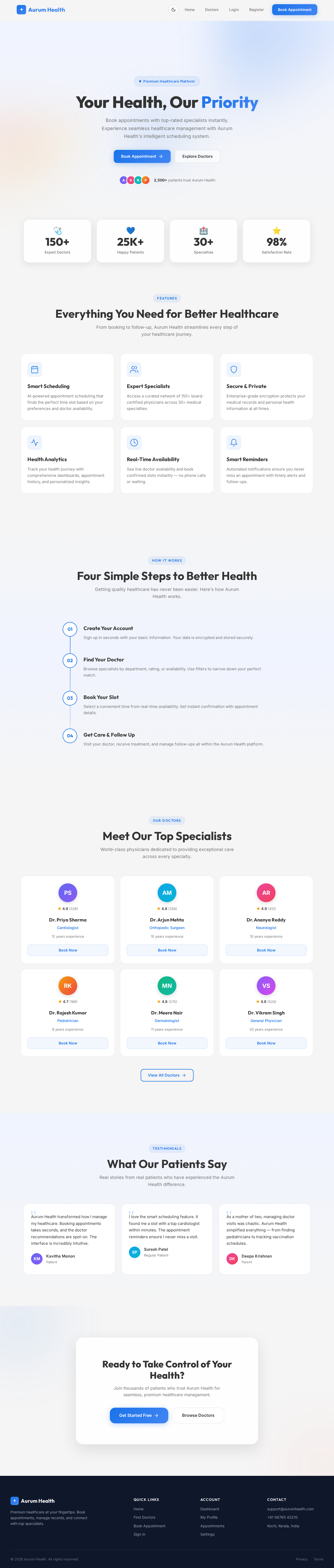
The homepage of the Aurum Health - Doctor Appointment System will feature a Liquid Glass UI with a glassmorphism effect, creating a sense of depth and luxury. Users will be greeted with a cinematic hero section that includes liquid morphing blobs and floating particles. The page transitions will be smooth and fluid, enhanced by GSAP and AOS animations. Magnetic buttons will provide an interactive experience, while glowing cards and animated gradients add visual appeal. The design will incorporate elegant typography and support both dark and light modes. The use of Three.js/Vanta.js will allow for optional 3D effects, creating an immersive experience. The homepage will be interactive, allowing users to hover over elements to see ripple effects and morphing SVGs. The design will be responsive, ensuring a consistent experience across devices.

Interaction Model & Motion Direction

The landing page will utilize a parallax interaction model, providing layered depth and a visually rich first impression. Decorative layers, such as atmospheric blobs and floating particles, will translate at different speeds, while real content scrolls naturally. This approach is ideal for storytelling and creating an engaging user experience. Internal pages, such as the dashboard and profile settings, will adopt a static interaction model to prioritize layout clarity and reading speed.

Page 5 of 6

Non-Functional Requirements

  • The application must maintain a consistent 60fps animation performance.
  • The design must be responsive and adapt to various screen sizes.
  • The codebase should be well-commented and organized with a clean folder structure.
  • The application should load quickly and provide a seamless user experience.

Tech Stack

  • Frontend: HTML5, CSS3, JavaScript (ES6), Bootstrap 5
  • Libraries: GSAP, AOS, Swiper.js, Three.js/Vanta.js (optional), Chart.js, Lottie

Assumptions and Constraints

  • The project is a front-end demonstration only, with no backend integration.
  • The focus is on premium UI/UX design rather than backend functionality.
  • The application will use realistic dummy data for demonstration purposes.
Page 6 of 6

Glossary

  • Glassmorphism: A design trend that uses transparency, blur, and shadow to create a frosted-glass effect.
  • Liquid Morphing: An animation technique where shapes smoothly transition between forms.
  • Parallax: A scrolling effect where background images move slower than foreground images, creating a sense of depth.
  • GSAP: GreenSock Animation Platform, a JavaScript library for creating high-performance animations.
  • AOS: Animate On Scroll, a library for animating elements as they scroll into view.
  • Swiper.js: A modern mobile touch slider with hardware-accelerated transitions.
  • Three.js/Vanta.js: Libraries for creating 3D graphics and animations in the browser.
  • Chart.js: A simple yet flexible JavaScript charting library for designers and developers.
  • Lottie: A library for rendering animations exported in the bodymovin JSON format.
Landing design preview
Landing: View Hero
Login: Sign In
Admin Dashboard: View Overview
Admin Dashboard: Manage Doctors
Admin Dashboard: Add Doctor Profile
Admin Dashboard: Manage Patients
Admin Dashboard: View System Charts
Admin Dashboard: View Calendar
Settings: Configure System
Settings: Manage Permissions