AWS tools
 Mohammed Shoaib
can u create a AWS tool which can launch EC2 machines for free of cost i want to practice in this app can u create the application.


Comments (0)
Sign in to leave a comment
System Requirements
AWS Tools
Introduction
The AWS Tools project aims to develop an application that allows users to launch EC2 machines for educational purposes. This tool is designed to facilitate learning and guidance in using AWS services, specifically focusing on providing a cost-free environment for practice.
System Overview
AWS Tools is an educational application that enables users to launch and manage EC2 instances without incurring costs. The application is tailored for individuals seeking to learn and practice AWS services, offering a guided experience to enhance their understanding of cloud computing.
Functional Requirements
- As a User, I should be able to launch EC2 instances for educational purposes.
- As a User, I should be able to manage the lifecycle of EC2 instances (start, stop, terminate).
- As a User, I should be able to access a guided tutorial on using AWS services.
- As a User, I should be able to view the status and details of my EC2 instances.
- As a User, I should be able to receive notifications about my EC2 instances' status changes.
User Personas
- Learner: Individuals who are new to AWS and want to practice launching and managing EC2 instances.
- Educator: Instructors who guide learners through AWS services and need a platform to demonstrate EC2 functionalities.
Core User Flows
- Learner logs into the application -> accesses tutorial -> launches EC2 instance -> manages instance lifecycle -> views instance status.
- Educator logs into the application -> sets up a learning session -> guides learners through launching EC2 instances -> monitors learner progress.
Visuals Colors and Theme
- primary: #1E3A8A (Deep Blue)
- primary_light: #3B82F6 (Light Blue)
- secondary: #F97316 (Orange)
- accent: #10B981 (Green)
- highlight: #F59E0B (Amber)
- bg: #F3F4F6 (Light Gray)
- surface: rgba(255, 255, 255, 0.8) (White)
- text: #111827 (Dark Gray)
- text_muted: #6B7280 (Muted Gray)
- border: rgba(209, 213, 219, 0.2) (Light Gray)
Signature Design Concept
The homepage of AWS Tools will feature an interactive 3D cloud environment using @react-three/fiber and @react-three/drei. Users can navigate through a virtual cloud landscape where each cloud represents a different AWS service. Hovering over a cloud will reveal more information about the service, and clicking will initiate a guided tutorial. This immersive experience will make learning AWS services engaging and memorable.
Interaction Model & Motion Direction
The landing page will utilize a "parallax" interaction model, creating a sense of depth as users scroll through the cloud environment. Each section will have a distinctive mechanic, such as 3D cloud navigation, to maintain user engagement. Internal pages will follow a "static" model to ensure clarity and focus on content.
Non-Functional Requirements
- The application must ensure secure access control to prevent unauthorized usage.
- The system should be scalable to accommodate a growing number of users.
- The application should provide a responsive design for accessibility on various devices.
Tech Stack
- Frontend: React for Web
- Backend: Python, FastAPI
- Database: MySQL or MariaDB
- AI Tools: Not applicable
- Local Orchestration: Docker, docker-compose
- Server-side Orchestration: Kubernetes
Assumptions and Constraints
- The application is intended for educational purposes and should not be used for production workloads.
- Users must have an AWS account to utilize the EC2 services.
- The application will operate within the free tier limits of AWS services.
Glossary
- EC2: Amazon Elastic Compute Cloud, a web service that provides resizable compute capacity in the cloud.
- AWS: Amazon Web Services, a comprehensive cloud computing platform provided by Amazon.
- Instance: A virtual server in the AWS cloud.
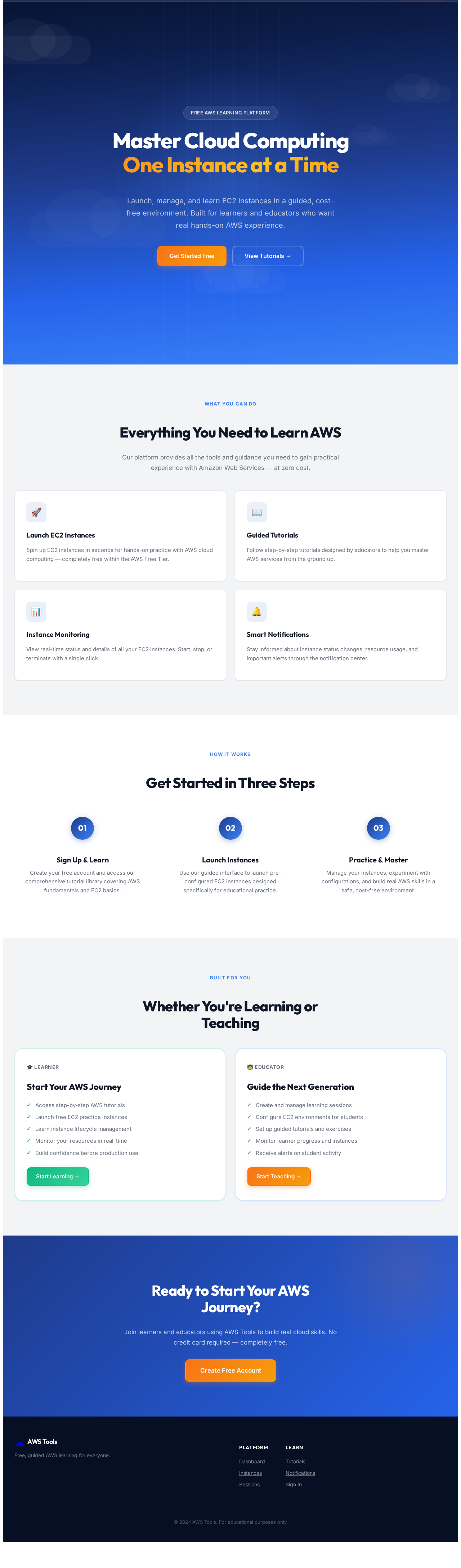
Master Cloud Computing One Instance at a Time
Launch, manage, and learn EC2 instances in a guided, cost-free environment. Built for learners and educators who want real hands-on AWS experience.
Everything You Need to Learn AWS
Our platform provides all the tools and guidance you need to gain practical experience with Amazon Web Services — at zero cost.
Launch EC2 Instances
Spin up EC2 instances in seconds for hands-on practice with AWS cloud computing — completely free within the AWS Free Tier.
Guided Tutorials
Follow step-by-step tutorials designed by educators to help you master AWS services from the ground up.
Instance Monitoring
View real-time status and details of all your EC2 instances. Start, stop, or terminate with a single click.
Smart Notifications
Stay informed about instance status changes, resource usage, and important alerts through the notification center.
Get Started in Three Steps
Sign Up & Learn
Create your free account and access our comprehensive tutorial library covering AWS fundamentals and EC2 basics.
Launch Instances
Use our guided interface to launch pre-configured EC2 instances designed specifically for educational practice.
Practice & Master
Manage your instances, experiment with configurations, and build real AWS skills in a safe, cost-free environment.
Whether You're Learning or Teaching
Start Your AWS Journey
- Access step-by-step AWS tutorials
- Launch free EC2 practice instances
- Learn instance lifecycle management
- Monitor your resources in real-time
- Build confidence before production use
Guide the Next Generation
- Create and manage learning sessions
- Configure EC2 environments for students
- Set up guided tutorials and exercises
- Monitor learner progress and instances
- Receive alerts on student activity
Ready to Start Your AWS Journey?
Join learners and educators using AWS Tools to build real cloud skills. No credit card required — completely free.
Create Free Account
No comments yet. Be the first!