AI-driven interview
 Sriharish. S
AI Interview Platform Website UI Prompt Design and build a modern, premium, AI-powered Interview Platform with a clean, futuristic, and professional appearance. The website should feel similar in quality to Stripe, Linear, Vercel, Notion, and OpenAI, with smooth animations and an excellent user experience. Theme Modern AI & SaaS style Minimal and clean interface Premium glassmorphism effects Rounded corners (16–20px) Soft shadows Subtle gradients Plenty of whitespace Fully responsive (Mobile, Tablet, Desktop) Fast loading Accessible UI Color Palette Primary: #4F46E5 (Indigo) Secondary: #7C3AED (Purple) Accent: #06B6D4 (Cyan) Success: #22C55E Danger: #EF4444 Warning: #F59E0B Background (Light): #F8FAFC Background (Dark): #0F172A Cards: White (Light) #1E293B (Dark) Text: #111827 (Light) #F8FAFC (Dark) Typography Font: Inter Heading Weight: 700–800 Body: 400–500 Buttons: Semi Bold Landing Page Sections Hero Section Include: Large headline: "Hire Smarter with AI-Powered Interviews" Subtitle: Automate resume screening, conduct AI interviews, evaluate candidates instantly, and streamline hiring with intelligent automation. Buttons: Get Started Book Demo Right Side: AI dashboard illustration or 3D-style graphic Floating analytics cards Resume score widget AI interview score widget Features Section Display feature cards with icons. Features: AI Resume Analysis AI Interview Generator Voice-to-Text Answers Webcam Recording AI Score Generation Performance Analytics Automated Email Results HR Dashboard Secure Authentication Cards should have: Hover lift effect Gradient icon background Smooth shadow animation How It Works Create a horizontal timeline: Register Upload Resume AI Resume Analysis Start AI Interview AI Evaluation HR Review Automatic Email Result Use connecting lines and animated icons. Dashboard Preview Show mock dashboard cards: Total Candidates Interviews Resume Score AI Score Analytics Chart Pass Rate Use glassmorphism cards. Statistics Section Animated counters: 20K+ Interviews 500+ Companies 98% Accuracy 50K+ Candidates Count-up animation on scroll. Testimonials Three premium testimonial cards. Hover animation: Slight scale Shadow increase Pricing Three pricing cards: Starter Professional Enterprise Highlight Professional plan. Footer Include: Company Features Contact Privacy Policy Terms Social Icons Candidate Dashboard Sidebar Navigation: Dashboard Resume AI Interview Results Analytics Profile Settings Logout Dashboard Cards: Resume Score AI Interview Score Completed Interviews Pending Interviews Charts: Performance Trend Skill Breakdown Recent Activity Table HR Dashboard Cards: Total Candidates Interviews Today Passed Failed Pending Review Candidate Table: Name Resume Score AI Score Status Actions Charts: Monthly Hiring Candidate Distribution Success Rate AI Interview Page Split layout: Left: AI-generated question Timer Progress bar Right: Webcam preview Microphone indicator Voice waveform animation Bottom: Previous Next Submit Resume Analysis Page Display: Overall Resume Score Progress bars: Skills Experience Education Projects Certifications AI Suggestions Card Strengths Weaknesses Missing Skills Result Page Large circular score indicator Overall AI Score Cards: Technical Communication Resume Confidence Decision Badge: Passed Failed Download Report button Animations Use subtle and smooth animations only. Hero: Fade-in Slide-up Floating dashboard cards Buttons: Scale to 1.05 on hover Soft glow effect Cards: Lift on hover Shadow transition Border glow Icons: Rotate slightly on hover Sections: Fade in on scroll Slide up on appearance Charts: Animate when visible Counters: Count up on scroll Sidebar: Smooth expand/collapse Page transitions: Fade + slide Loading: Skeleton loaders Animated spinner Notifications: Toast slide-in from top-right Avoid excessive animations that distract users. UI Components Navbar Hero Buttons Cards Modals Forms Tables Charts Sidebar Top Navigation Search Bar Profile Dropdown Toast Notifications Progress Bars Circular Progress Timeline Accordions Tabs Pagination File Upload Webcam Component AI Chat Bubble Analytics Widgets Technical Requirements Framework: Next.js (App Router) TypeScript Styling: Tailwind CSS shadcn/ui Animations: Framer Motion Icons: Lucide React Charts: Recharts Forms: React Hook Form + Zod Theme: Light/Dark mode toggle Design Principles: Reusable components Clean architecture Responsive layout Accessible (WCAG) Optimized performance Modern SaaS aesthetic Consistent spacing and typography Smooth micro-interactions Professional enterprise-quality UI suitable for an AI recruitment platform.


Comments (0)
Sign in to leave a comment
System Requirements
AI-driven Interview System Requirements Document
1. Introduction
The AI-driven Interview project aims to design and build a modern, premium, AI-powered Interview Platform. This platform will feature a clean, futuristic, and professional appearance, providing a user experience similar in quality to leading tech companies like Stripe, Linear, Vercel, Notion, and OpenAI.
2. System Overview
The AI-driven Interview platform will leverage advanced AI technologies to automate and enhance the recruitment process. It will include features such as AI resume analysis, AI interview generation, and performance analytics, all within a responsive and accessible user interface. The platform will support multiple devices, ensuring a seamless experience across mobile, tablet, and desktop.
3. Functional Requirements
- As a User, I should be able to automate resume screening using AI.
- As a User, I should be able to conduct AI interviews.
- As a User, I should be able to evaluate candidates instantly with AI-generated scores.
- As a User, I should be able to streamline hiring with intelligent automation.
- As a User, I should be able to access a secure authentication system.
- As a User, I should be able to view performance analytics.
- As a User, I should be able to receive automated email results.
- As a User, I should be able to access an HR dashboard for managing candidates.
- As a User, I should be able to record interviews via webcam.
- As a User, I should be able to convert voice answers to text.
- As a User, I should be able to view a timeline of the interview process.
- As a User, I should be able to view statistics and testimonials.
- As a User, I should be able to choose from different pricing plans.
- As a User, I should be able to toggle between light and dark modes.
4. User Personas
- Candidate: Individuals applying for jobs, using the platform to submit resumes and participate in AI interviews.
- HR Manager: Professionals responsible for managing recruitment processes, using the platform to evaluate candidates and make hiring decisions.
- Administrator: Users with access to manage platform settings and oversee the recruitment process.
5. Core User Flows
- Candidate registers -> uploads resume -> AI analyzes resume -> Candidate starts AI interview -> AI evaluates -> HR reviews -> Automatic email result sent.
- HR Manager logs in -> views dashboard -> reviews candidate scores -> makes hiring decisions -> sends feedback to candidates.
- Administrator logs in -> manages user accounts -> configures platform settings -> monitors system performance.
6. Visuals Colors and Theme
- primary: #4F46E5 (Indigo)
- primary_light: #6366F1 (Light Indigo)
- secondary: #7C3AED (Purple)
- accent: #06B6D4 (Cyan)
- highlight: #F59E0B (Amber)
- bg: #F8FAFC (Light Background)
- surface: rgba(30, 41, 59, 0.8) (Dark Card Background)
- text: #111827 (Dark Text)
- text_muted: #6B7280 (Muted Text)
- border: rgba(209, 213, 219, 0.2) (Subtle Border)
7. Signature Design Concept
The homepage will feature an interactive 3D AI dashboard where users can explore different sections by navigating through floating analytics cards and widgets. Using @react-three/fiber and @react-three/drei, the dashboard will provide a dynamic experience, allowing users to click on elements to reveal more information and interact with AI-generated content. The design will incorporate glassmorphism effects, creating a futuristic and immersive environment.
8. Interaction Model & Motion Direction
The landing page will utilize a "parallax" interaction model, with layered depth via scroll. Decorative elements will translate at different speeds, creating a visually rich first impression. Internal pages will maintain a "static" model for clarity and ease of use, with minimal motion to enhance readability.
9. Non-Functional Requirements
- The platform must be fully responsive and accessible, adhering to WCAG standards.
- It should load quickly, with optimized performance for all devices.
- The UI should maintain a consistent modern SaaS aesthetic with smooth micro-interactions.
10. Tech Stack
- Frontend: Next.js (App Router), TypeScript
- Styling: Tailwind CSS, shadcn/ui
- Animations: Framer Motion
- Icons: Lucide React
- Charts: Recharts
- Forms: React Hook Form + Zod
- Theme: Light/Dark mode toggle
11. Assumptions and Constraints
- The platform will primarily target users in India, considering locale-specific defaults such as currency and timezone.
- The system will be designed to handle a large number of concurrent users, ensuring scalability and reliability.
12. Glossary
- AI Interview: An interview conducted using AI technologies to evaluate candidates.
- Glassmorphism: A design style that uses transparency and blur effects to create a frosted-glass appearance.
- Parallax: A scrolling technique where background images move slower than foreground images, creating an illusion of depth.
- WCAG: Web Content Accessibility Guidelines, a set of recommendations for making web content more accessible.
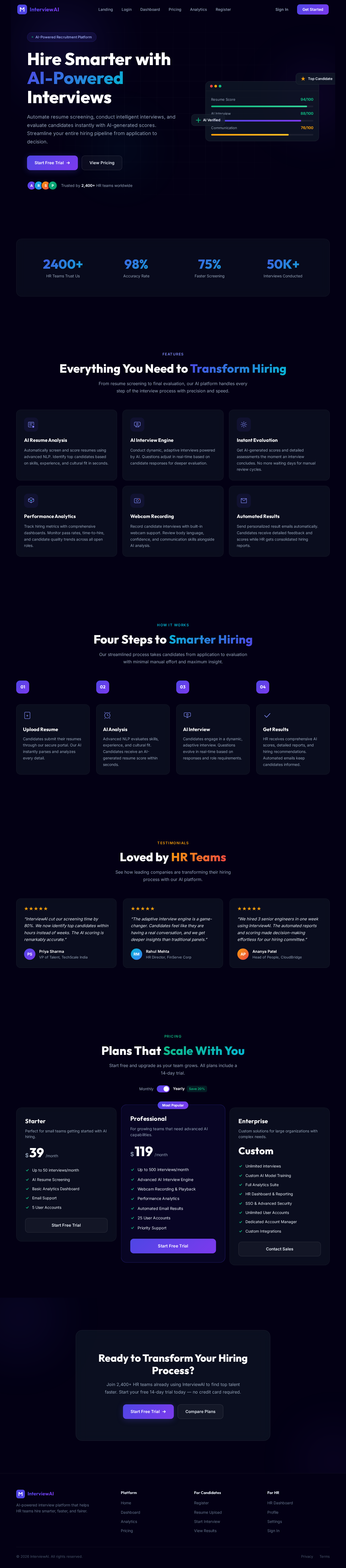
Hire Smarter with AI-Powered
Interviews
Automate resume screening, conduct intelligent interviews, and evaluate candidates instantly with AI-generated scores. Streamline your entire hiring pipeline from application to decision.
Trusted by 2,400+ HR teams worldwide
Everything You Need to Transform Hiring
From resume screening to final evaluation, our AI platform handles every step of the interview process with precision and speed.
AI Resume Analysis
Automatically screen and score resumes using advanced NLP. Identify top candidates based on skills, experience, and cultural fit in seconds.
AI Interview Engine
Conduct dynamic, adaptive interviews powered by AI. Questions adjust in real-time based on candidate responses for deeper evaluation.
Instant Evaluation
Get AI-generated scores and detailed assessments the moment an interview concludes. No more waiting days for manual review cycles.
Performance Analytics
Track hiring metrics with comprehensive dashboards. Monitor pass rates, time-to-hire, and candidate quality trends across all open roles.
Webcam Recording
Record candidate interviews with built-in webcam support. Review body language, confidence, and communication skills alongside AI analysis.
Automated Results
Send personalized result emails automatically. Candidates receive detailed feedback and scores while HR gets consolidated hiring reports.
Four Steps to Smarter Hiring
Our streamlined process takes candidates from application to evaluation with minimal manual effort and maximum insight.
Upload Resume
Candidates submit their resumes through our secure portal. Our AI instantly parses and analyzes every detail.
AI Analysis
Advanced NLP evaluates skills, experience, and cultural fit. Candidates receive an AI-generated resume score within seconds.
AI Interview
Candidates engage in a dynamic, adaptive interview. Questions evolve in real-time based on responses and role requirements.
Get Results
HR receives comprehensive AI scores, detailed reports, and hiring recommendations. Automated emails keep candidates informed.
Loved by HR Teams
See how leading companies are transforming their hiring process with our AI platform.
“InterviewAI cut our screening time by 80%. We now identify top candidates within hours instead of weeks. The AI scoring is remarkably accurate.”
“The adaptive interview engine is a game-changer. Candidates feel like they are having a real conversation, and we get deeper insights than traditional panels.”
“We hired 3 senior engineers in one week using InterviewAI. The automated reports and scoring made decision-making effortless for our hiring committee.”
Plans That Scale With You
Start free and upgrade as your team grows. All plans include a 14-day trial.
Starter
Perfect for small teams getting started with AI hiring.
- Up to 50 interviews/month
- AI Resume Screening
- Basic Analytics Dashboard
- Email Support
- 5 User Accounts
Professional
For growing teams that need advanced AI capabilities.
- Up to 500 interviews/month
- Advanced AI Interview Engine
- Webcam Recording & Playback
- Performance Analytics
- Automated Email Results
- 25 User Accounts
- Priority Support
Enterprise
Custom solutions for large organizations with complex needs.
- Unlimited interviews
- Custom AI Model Training
- Full Analytics Suite
- HR Dashboard & Reporting
- SSO & Advanced Security
- Unlimited User Accounts
- Dedicated Account Manager
- Custom Integrations
Ready to Transform Your Hiring Process?
Join 2,400+ HR teams already using InterviewAI to find top talent faster. Start your free 14-day trial today — no credit card required.
No comments yet. Be the first!