AI STUDIO

byM Chavan

AI Creator OS ├── Dashboard ├── AI Chat ├── Research ├── Trend Finder ├── Script Studio ├── Thumbnail Studio ├── Image Studio ├── Video Studio ├── Voice Studio ├── Music Studio ├── Shorts Creator ├── Reel Creator ├── Long Video Creator ├── Scheduler ├── Auto Publish ├── Analytics ├── AI Agents ├── Settings └── Admin Panel

LoginDashboardAI Chat
Login

Comments (0)

No comments yet. Be the first!

System Requirements

System Requirement Document
Page 1 of 5

AI STUDIO System Requirements Document

1. Introduction

AI STUDIO is a comprehensive platform designed to empower creators by automating the video creation process. The application aims to facilitate content creation for platforms like YouTube and Instagram, offering a suite of tools for video production, trend analysis, and automated publishing.

2. System Overview

AI STUDIO provides a zero-cost solution for creators to automate their video production workflow. The platform includes various studios and tools such as AI Chat, Research, Trend Finder, Script Studio, Thumbnail Studio, Image Studio, Video Studio, Voice Studio, Music Studio, Shorts Creator, Reel Creator, Long Video Creator, Scheduler, Auto Publish, Analytics, AI Agents, Settings, and an Admin Panel. The goal is to streamline the process from concept to publication, allowing creators to focus on content quality and audience engagement.

Page 2 of 5

3. Functional Requirements

  • As a Creator, I should be able to access a Dashboard that provides an overview of my projects and analytics.
  • As a Creator, I should be able to use AI Chat for interactive assistance and idea generation.
  • As a Creator, I should be able to conduct Research to find trending topics and related news.
  • As a Creator, I should be able to use Trend Finder to identify viral topics for content creation.
  • As a Creator, I should be able to use Script Studio to prepare scripts for my videos.
  • As a Creator, I should be able to use Thumbnail Studio to design engaging thumbnails.
  • As a Creator, I should be able to use Image Studio to create and edit images for my content.
  • As a Creator, I should be able to use Video Studio to produce and edit videos.
  • As a Creator, I should be able to use Voice Studio to add voiceovers to my videos.
  • As a Creator, I should be able to use Music Studio to incorporate music into my videos.
  • As a Creator, I should be able to use Shorts Creator to produce short-form video content.
  • As a Creator, I should be able to use Reel Creator to create engaging reels for social media.
  • As a Creator, I should be able to use Long Video Creator to produce longer video content.
  • As a Creator, I should be able to use Scheduler to plan and schedule my content releases.
  • As a Creator, I should be able to use Auto Publish to automate the publishing of my content.
  • As a Creator, I should be able to access Analytics to track the performance of my content.
  • As a Creator, I should be able to use AI Agents to automate repetitive tasks and enhance productivity.
  • As a Creator, I should be able to configure Settings to customize my user experience.
  • As an Admin, I should be able to manage user accounts and platform settings through the Admin Panel.

4. User Personas

  • Creator: Individuals or teams who use AI STUDIO to automate and enhance their content creation process.
  • Admin: Users responsible for managing the platform, overseeing user accounts, and maintaining system settings.
Page 3 of 5

5. Core User Flows

  • Creator accesses Dashboard -> selects a studio (e.g., Script Studio) -> prepares content -> uses Scheduler to plan release -> Auto Publish posts content.
  • Creator uses Trend Finder -> identifies viral topic -> uses Script Studio to draft script -> Video Studio to create video -> Analytics to track performance.
  • Admin logs into Admin Panel -> manages user accounts -> configures platform settings.

6. Visuals Colors and Theme

  • primary: #1E3A8A (Deep Indigo)
  • primary_light: #3B82F6 (Sky Blue)
  • secondary: #F59E0B (Amber)
  • accent: #EF4444 (Red)
  • highlight: #FBBF24 (Gold)
  • bg: #F3F4F6 (Light Gray)
  • surface: rgba(255, 255, 255, 0.8)
  • text: #111827 (Dark Gray)
  • text_muted: #6B7280 (Muted Gray)
  • border: rgba(209, 213, 219, 0.5)

7. Signature Design Concept

The AI STUDIO homepage will feature an interactive "Creative Canvas" concept. Users will be greeted with a dynamic, 3D workspace where each studio (e.g., Script Studio, Video Studio) is represented as a floating, interactive tool. Users can click and drag these tools to explore their functionalities. The background will subtly shift colors based on the time of day, providing a living, breathing environment. This concept will be brought to life using @react-three/fiber for 3D interactions and gsap for smooth animations and transitions.

Page 4 of 5

8. Interaction Model & Motion Direction

The landing page will employ a "parallax" interaction model, providing a layered depth effect as users scroll through the page. Decorative elements will move at different speeds to create a sense of immersion, while key content remains in the natural flow. Internal pages will adopt a "static" model to ensure clarity and focus on content.

9. Non-Functional Requirements

  • The system must support high concurrency to accommodate a large number of simultaneous users.
  • The application should be optimized for performance to ensure quick load times and responsiveness.
  • Data security and user privacy must be prioritized, with secure access controls and data encryption.

10. Tech Stack

  • Frontend: React for Web
  • Backend: Python, FastAPI
  • Database RDBMS: MySQL or MariaDB, with alembic for migrations
  • Database NoSQL: MongoDB
  • AI Models: GPT 5.4, Claude Sonnet 5, Gemini 3.1 pro, Google Nano banana
  • AI Tools: Litellm, Langchain
  • Local Orchestration: Docker, docker-compose
  • Server-side Orchestration: Kubernetes
Page 5 of 5

11. Assumptions and Constraints

  • The application will be developed as a zero-cost solution, leveraging open-source technologies where possible.
  • The platform must be scalable to support future growth and additional features.
  • Internet connectivity is required for full functionality, particularly for AI-driven features.

12. Glossary

  • AI Studio: The platform designed for automated video content creation.
  • Dashboard: A user interface that provides an overview of the user's projects and analytics.
  • AI Chat: An interactive tool for idea generation and assistance.
  • Trend Finder: A tool for identifying viral topics.
  • Script Studio: A tool for preparing video scripts.
  • Scheduler: A tool for planning and scheduling content releases.
  • Auto Publish: A feature that automates the publishing of content.
  • Analytics: Tools for tracking content performance.
  • AI Agents: Automated tools that perform repetitive tasks to enhance productivity.
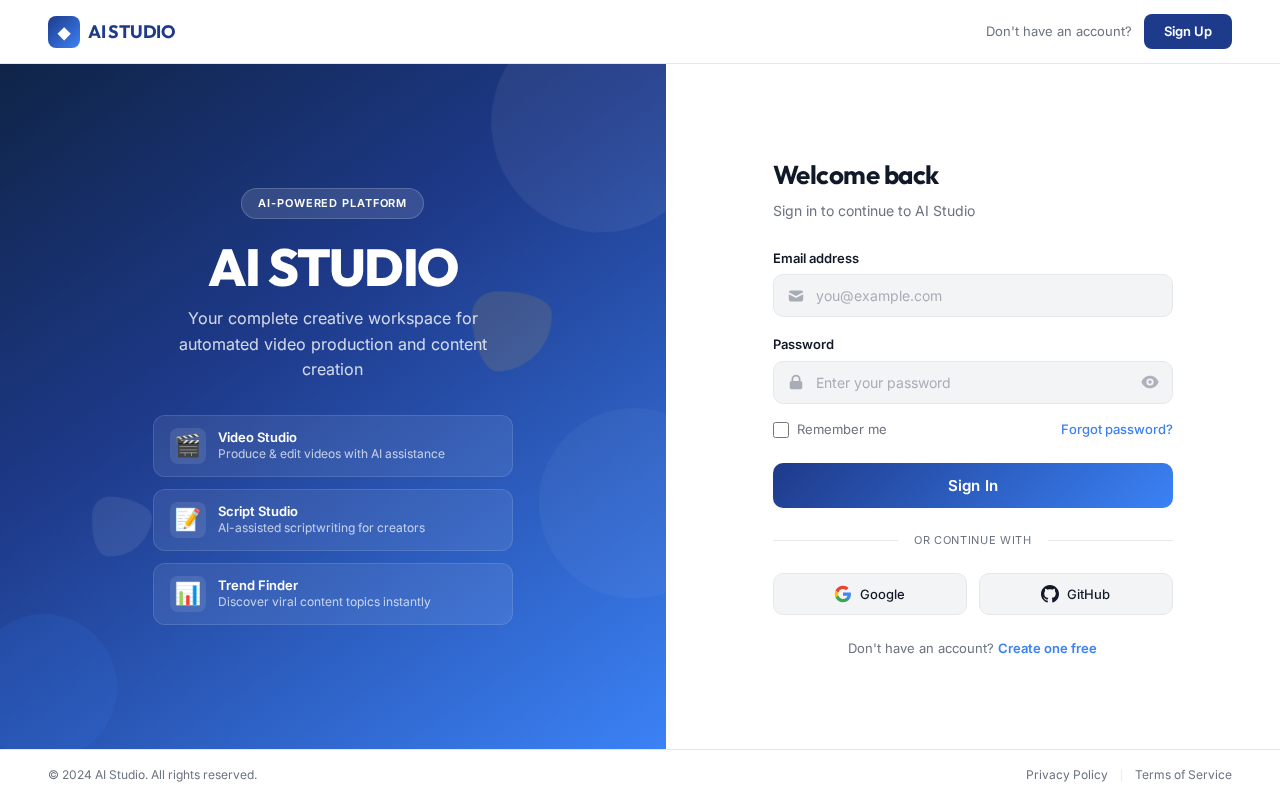
Login design preview
Login: Sign In
Admin Panel: View Dashboard
Admin Panel: Manage Users
Admin Panel: Manage Accounts
Admin Panel: Configure Settings
Admin Panel: Monitor Platform