Day 03 · Question 01Answered 00/03
Which word completes the pattern: आज, कल, ______ ?
Selected — · 00 of 03 answered
 Janvi shah
Create this multimodal app for the same


Sign in to leave a comment
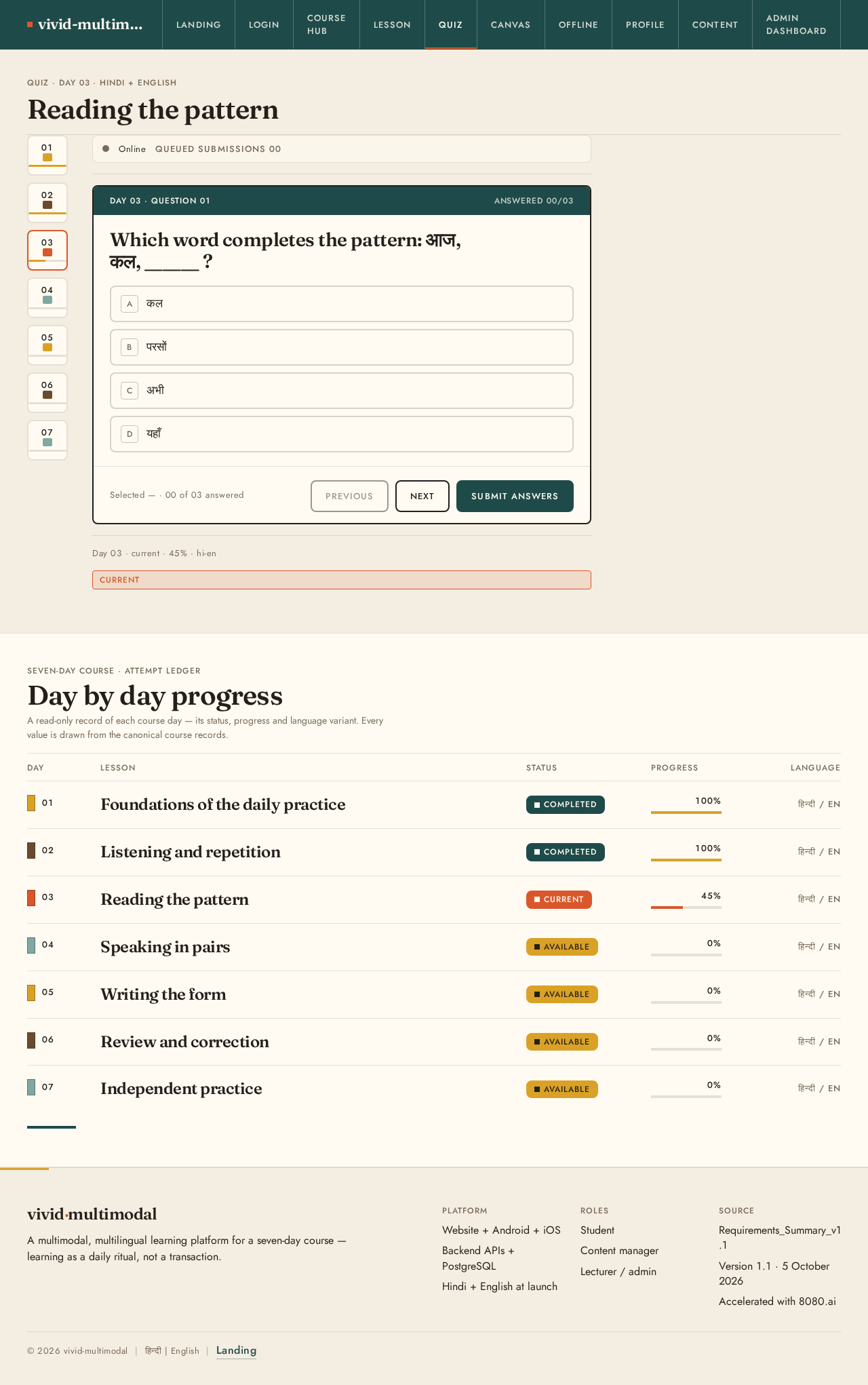
Quiz · Day 03 · Hindi + English
Day 03 · current · 45% · hi-en
currentSeven-day course · Attempt ledger
A read-only record of each course day — its status, progress and language variant. Every value is drawn from the canonical course records.
| Day | Lesson | Status | Progress | Language |
|---|---|---|---|---|
| Day01 | LessonFoundations of the daily practice | StatusCompleted | Progress100% | Languageहिन्दी / EN |
| Day02 | LessonListening and repetition | StatusCompleted | Progress100% | Languageहिन्दी / EN |
| Day03 | LessonReading the pattern | StatusCurrent | Progress45% | Languageहिन्दी / EN |
| Day04 | LessonSpeaking in pairs | StatusAvailable | Progress0% | Languageहिन्दी / EN |
| Day05 | LessonWriting the form | StatusAvailable | Progress0% | Languageहिन्दी / EN |
| Day06 | LessonReview and correction | StatusAvailable | Progress0% | Languageहिन्दी / EN |
| Day07 | LessonIndependent practice | StatusAvailable | Progress0% | Languageहिन्दी / EN |

vivid-multimodal · Course index
A seven-day multilingual classroom in Hindi and English. Every day is a panel you can open — read it, hear it, draw on it, and keep going. Built to work on low-end Android devices, mobile and web.
The lesson, section by section
A lesson section is not one page but three modes that carry the same idea — read it, hear it, then sit with it. Each opens as a numbered panel, in order, like work hung along a gallery wall.
Lesson mode · Text
Every lesson section opens as a structured text panel: a short framing note, the key pattern of the day, and a worked example. Hindi and English sit side by side so a learner can move at their own pace, on a low-end phone, without losing the thread.
Lesson mode · Audio
Each section pairs the text with a spoken guide. The recording is presented as a pattern strip rather than a modern player — the shape of the sentence made visible, so learners can see where a phrase rises and where it rests before they repeat it.
Lesson mode · Image
Image sections anchor the day in the physical ritual of study — an open notebook, a hand marking the margin. On the canvas the learner can annotate the same page, and the marks stay with their progress for the next day.

A downloaded lesson pack is one made object: a manifest that names its version, files, checksums and dependencies, sitting above the accepted offline capabilities and how each is implemented on device.
The backend returns the pack version so the client can tell which pack is present.
Every lesson asset the pack carries, listed so the client knows what to fetch.
Checksums and metadata travel with each file so stored copies can be verified.
Declared dependencies between pack parts, so a pack resolves as one object.
| Marker | Capability | Implementation | Behaviour |
|---|---|---|---|
| Download manifest | Backend returns version, files, checksums / metadata and dependencies | The manifest is the one response that describes the whole pack. | |
| Local text | Structured lesson data in Expo SQLite | Lesson text is stored as structured rows, not a flattened blob. | |
| Local media | Audio and images in Expo FileSystem | Media files are addressed by path on the device filesystem. | |
| Local progress | Progress written locally while offline | Completion is recorded on device before any network call. | |
| Sync queue | Queued mutations carry unique client event IDs | Each queued operation is identified by a client-generated event ID. | |
| Reconnect | Queued operations sent to the backend and processed idempotently | Replayed operations are safe to send more than once. | |
| Conflicts | Explicit version / timestamp rules resolve divergence | The rule applied is stated, not inferred. | |
| Partial download | Each asset tracked; only failed assets retried | An interrupted pack resumes from the assets that did not land. | |
| Version changes | Outdated packs detected and updated safely | A pack identified as out of date is updated rather than duplicated. | |
| Completion | Duplicate completion events prevented | A repeated completion does not count twice. |
04Admin preview
This is a read-only look at the accepted admin and content-management surfaces. Every capability below is ruled as a row with tabular numerals — no floating cards, no hover-lift, no invented counts.
Create, edit and retire courses; set the published order in which a learner meets them.
Manage the seven-day lesson structure — titles, sequence and the sections that belong to each day.
Compose a lesson from structured content blocks: text, audio reference, image and practice prompts.
Hold a Hindi and an English variant of every block and keep the two language editions in step.
Manage audio, image and document assets with their variants, then attach them to a lesson block.
Author quiz questions, set the correct option and control the order a learner receives them in.
Stage strip
A roster of learners and staff with role, language preference and current course standing.
Open one learner to inspect per-day progress, quiz attempts and completion history.
Panels for completion, active learners and language split, ruled as tabular rows rather than floating tiles.
Export the current progress and completion view as a CSV for offline reporting.
Append-only record of editorial and administrative changes, retained for review.
Capability preview only — the working admin, content editor and publishing actions live in the authenticated admin surface. Nothing on this page writes, publishes or exports data.
Guest progress stays on this device; signing in keeps your seven-day record synced.
No comments yet. Be the first!