📌 PinnedPower BI
Best approach for incremental refresh in Power BI with large datasets?
We‘re dealing with 200M+ rows and the refresh time is hitting the 2‑hour limit. Looking for proven patterns using partitions and hybrid tables.
 Galam Sujith Yadav
https://quicklaunchanalytics.com/ bulid same company


Sign in to leave a comment
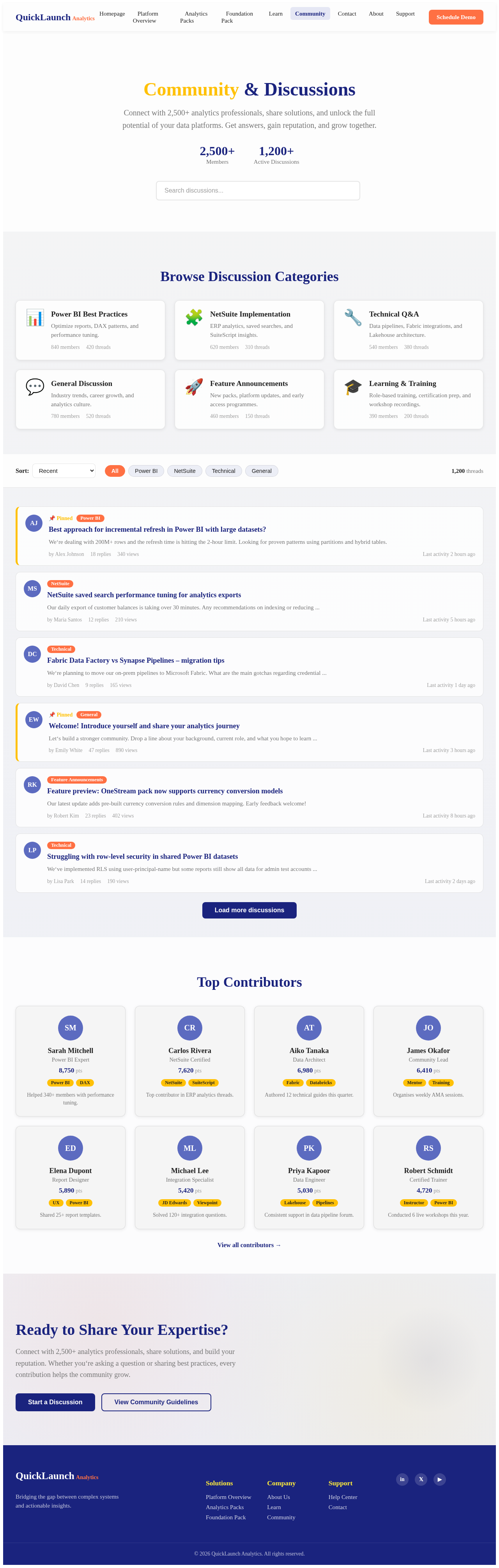
Connect with 2,500+ analytics professionals, share solutions, and unlock the full potential of your data platforms. Get answers, gain reputation, and grow together.
Optimize reports, DAX patterns, and performance tuning.
ERP analytics, saved searches, and SuiteScript insights.
Data pipelines, Fabric integrations, and Lakehouse architecture.
Industry trends, career growth, and analytics culture.
New packs, platform updates, and early access programmes.
Role‑based training, certification prep, and workshop recordings.
We‘re dealing with 200M+ rows and the refresh time is hitting the 2‑hour limit. Looking for proven patterns using partitions and hybrid tables.
Our daily export of customer balances is taking over 30 minutes. Any recommendations on indexing or reducing ...
We‘re planning to move our on‑prem pipelines to Microsoft Fabric. What are the main gotchas regarding credential ...
Let‘s build a stronger community. Drop a line about your background, current role, and what you hope to learn ...
Our latest update adds pre‑built currency conversion rules and dimension mapping. Early feedback welcome!
We‘ve implemented RLS using user‑principal‑name but some reports still show all data for admin test accounts ...
Power BI Expert
Helped 340+ members with performance tuning.
NetSuite Certified
Top contributor in ERP analytics threads.
Data Architect
Authored 12 technical guides this quarter.
Community Lead
Organises weekly AMA sessions.
Report Designer
Shared 25+ report templates.
Integration Specialist
Solved 120+ integration questions.
Data Engineer
Consistent support in data pipeline forum.
Certified Trainer
Conducted 6 live workshops this year.
Connect with 2,500+ analytics professionals, share solutions, and build your reputation. Whether you‘re asking a question or sharing best practices, every contribution helps the community grow.

QuickLaunch Analytics bridges the gap between your data platforms and the decisions that drive your business forward. Over 500 years of combined team experience powering 250+ enterprise implementations.
Powered by Databricks, Microsoft Fabric, and Power BI — our platform delivers a complete analytics foundation from data ingestion to actionable insights.
Built on Databricks and Microsoft Fabric with a Medallion architecture — Bronze, Silver, and Gold layers for governed, scalable data processing.
Modeled foundation with fact-dimension tables, semantic models, and partitioning methodology proven across 250+ enterprise implementations.
Streamlined ingestion and transformation with tools like Delta Editor, Schema Compare, and Tabular Editor 3 scripts for rapid deployment.
Optimized query performance through intelligent partitioning, currency conversion, and unit of measure conversion at enterprise scale.
Enterprise-grade security with Entra ID integration, ensuring the right people access the right data at the right time.
Comprehensive training tracks for Lakehouse Administrators, Data Modelers, Power BI Report Designers, and End Users.
Deploy production-ready analytics in weeks, not months. Each pack includes modeled tables, semantic layers, KPIs, and Power BI reports.
Comprehensive analytics pack for JD Edwards ERP with deep financial, supply chain, and manufacturing insights.
Learn more →Full-spectrum NetSuite analytics covering financials, inventory, CRM, and e-commerce data models.
Learn more →Purpose-built for construction accounting, project management, and equipment tracking workflows.
Learn more →Tailored analytics for specialty contractors with job costing, service management, and dispatch insights.
Learn more →Unified financial consolidation, planning, and reporting analytics for enterprise finance teams.
Learn more →Deep CRM analytics covering pipeline, lead conversion, customer lifetime value, and sales performance.
Learn more →Join 250+ enterprises that have accelerated their analytics journey. Typical deployment in 8–12 weeks at 40–60% lower implementation cost.
No comments yet. Be the first!