pearsley
 Meghna Rajawat
build this


Comments (0)
Sign in to leave a comment
Global sending mode set to Drafts-only.
09 / Viewings · Coordination reference
Viewings coordination reference
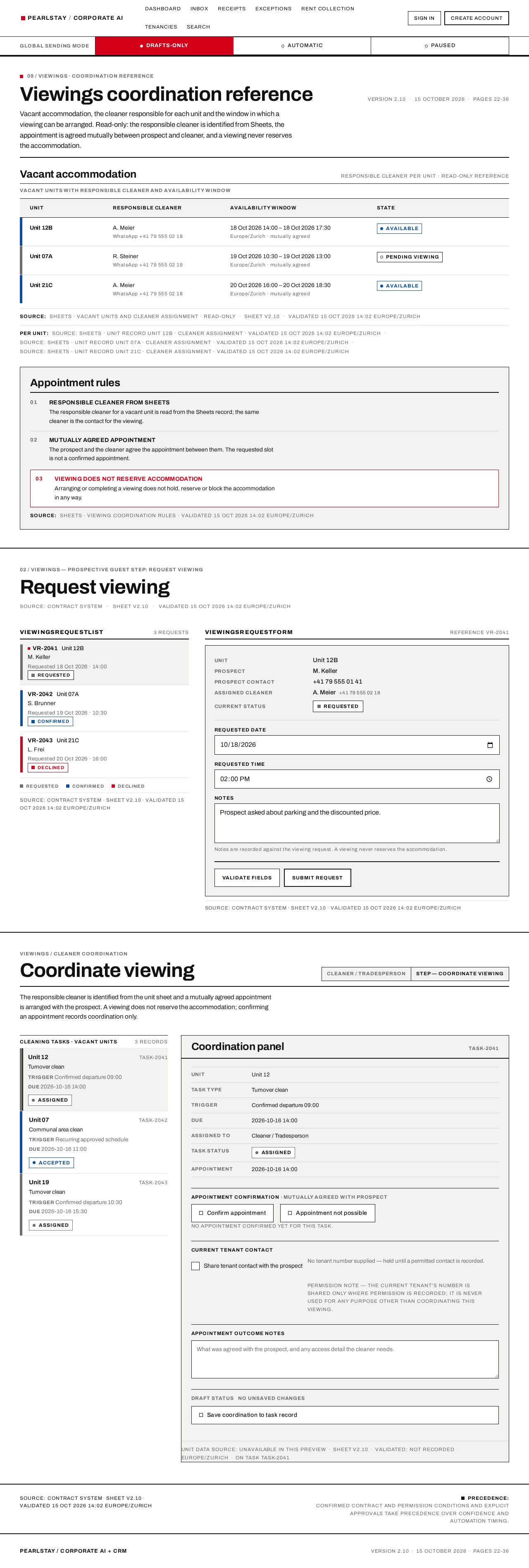
Vacant accommodation, the cleaner responsible for each unit and the window in which a viewing can be arranged. Read-only: the responsible cleaner is identified from Sheets, the appointment is agreed mutually between prospect and cleaner, and a viewing never reserves the accommodation.
Vacant accommodation
Responsible cleaner per unit · read-only reference
| Unit | Responsible cleaner | Availability window | State | |
|---|---|---|---|---|
| Unit 12B | A. MeierWhatsApp +41 79 555 02 18 | 18 Oct 2026 14:00 – 18 Oct 2026 17:30Europe/Zurich · mutually agreed | Available | |
| Unit 07A | R. SteinerWhatsApp +41 79 555 02 19 | 19 Oct 2026 10:30 – 19 Oct 2026 13:00Europe/Zurich · mutually agreed | Pending viewing | |
| Unit 21C | A. MeierWhatsApp +41 79 555 02 18 | 20 Oct 2026 16:00 – 20 Oct 2026 18:30Europe/Zurich · mutually agreed | Available |
- Unit 12B
- Available
- Responsible cleaner
- A. Meier · WhatsApp +41 79 555 02 18
- Availability window
- 18 Oct 2026 14:00 – 18 Oct 2026 17:30 · Europe/Zurich · mutually agreed
- Unit 07A
- Pending viewing
- Responsible cleaner
- R. Steiner · WhatsApp +41 79 555 02 19
- Availability window
- 19 Oct 2026 10:30 – 19 Oct 2026 13:00 · Europe/Zurich · mutually agreed
- Unit 21C
- Available
- Responsible cleaner
- A. Meier · WhatsApp +41 79 555 02 18
- Availability window
- 20 Oct 2026 16:00 – 20 Oct 2026 18:30 · Europe/Zurich · mutually agreed
Source:Sheets · vacant units and cleaner assignment · read-onlySheet v2.10Validated 15 Oct 2026 14:02 Europe/Zurich
Per unit:Source: Sheets · unit record Unit 12B · cleaner assignment · validated 15 Oct 2026 14:02 Europe/ZurichSource: Sheets · unit record Unit 07A · cleaner assignment · validated 15 Oct 2026 14:02 Europe/ZurichSource: Sheets · unit record Unit 21C · cleaner assignment · validated 15 Oct 2026 14:02 Europe/Zurich
Appointment rules
Responsible cleaner from Sheets
The responsible cleaner for a vacant unit is read from the Sheets record; the same cleaner is the contact for the viewing.
Mutually agreed appointment
The prospect and the cleaner agree the appointment between them. The requested slot is not a confirmed appointment.
Viewing does not reserve accommodation
Arranging or completing a viewing does not hold, reserve or block the accommodation in any way.
Source:Sheets · viewing coordination rules · validated 15 Oct 2026 14:02 Europe/Zurich
02 / Viewings — Prospective Guest step: Request viewing
Request viewing
ViewingsRequestList
3 requests- Requested
- Confirmed
- Declined
SOURCE: Contract system · SHEET v2.10 · VALIDATED 15 Oct 2026 14:02 Europe/Zurich
ViewingsRequestForm
Reference VR-2041- Unit
- Unit 12B
- Prospect
- M. Keller
- Prospect contact
- +41 79 555 01 41
- Assigned cleaner
- A. Meier+41 79 555 02 18
- Current status
- Requested
Notes are recorded against the viewing request. A viewing never reserves the accommodation.
Check these fields before submitting
SOURCE: Contract system · SHEET v2.10 · VALIDATED 15 Oct 2026 14:02 Europe/Zurich
Coordinate viewing
Cleaner / TradespersonStep — Coordinate viewing
The responsible cleaner is identified from the unit sheet and a mutually agreed appointment is arranged with the prospect. A viewing does not reserve the accommodation; confirming an appointment records coordination only.
Coordination panel
task-2041No appointment confirmed yet for this task.
Unit data source: unavailable in this previewSheet v2.10Validated: not recordedEurope/Zurichon task task-2041
SOURCE: Contract systemSHEET v2.10VALIDATED 15 Oct 2026 14:02 Europe/Zurich
PRECEDENCE:Confirmed contract and permission conditions and explicit approvals take precedence over confidence and automation timing.

Global sending mode set to Drafts-only.
Pearlstay / Corporate AIOne CRM. Traceable rules. No unchecked sends.
A WhatsApp AI for guests and prospects, and one CRM for rentals, accounting, rent collection and Beds24 channel management. Every rule is versioned, every check is recorded, and nothing is sent until its conditions are revalidated.
02 / System overview
How an inbound message is processed
Gates 01-06
An inbound WhatsApp message is authenticated, deduplicated and classified, then checked against availability, price, payment status, permissions and approvals before any reply is sent. It exits into exactly one of two coded outcomes.
- Automaticevery gate passed
- Drafts-onlyheld for staff review
Source: Contract systemSheet v2.10Validated 15 Oct 2026 14:02 Europe/Zurich
04 / Sending modes
Global sending mode and per-process modes
One global sending mode governs every outbound message on the platform. Each process then runs in its own mode underneath it. The global mode always wins: if sending is paused, no process sends, whatever its own mode says.
Global sending mode
Three cells · one active · platform-wide
Outbound guest and prospect messages are prepared as drafts for staff review. Nothing leaves the platform until a staff member approves and sends it.
Sending blocked · staff approval required
Messages are sent automatically only after every hard check passes and the configured confidence threshold is met for that process.
Sending permitted where all checks pass
External sending stops immediately and stays stopped until the mode is deliberately changed. Queued actions are held, not discarded.
Emergency stop · sending suspended
Drafts-only is the global override. It outranks a process set to automatic, and it blocks the release of access details, offers and payment confirmations until a staff member sends them.
Per-process modes
Automatic / review / disabled · set per process
Applies to the named process only. The reply is generated, all hard checks are re-run immediately before sending, and the message is released without staff involvement.
The process prepares the reply and files it for staff review. A staff member edits, approves or rejects it; only an approved draft is sent.
The process produces no outbound message at all. Its internal tasks still run and still appear in the CRM queues, but nothing is drafted for sending.
Internal accounting tasks and arrears alerts operate independently of the global sending mode. Rent obligations, allocation checks and arrears cases continue to be created and surfaced in the CRM while sending is drafts-only or paused.
Business authority is separate from sending permission. Being responsible for a decision does not authorise the system to send it; approval is bound to the exact action details and is invalidated when those details materially change.
A confidence score never grants authority. A high confidence score does not bypass availability, price, payment, permission or approval conditions, and it is not a substitute for deterministic validation.
SOURCE: Contract system · SHEET v2.10 · VALIDATED 15 Oct 2026 14:02 Europe/Zurich
05 / Workflow gates and acceptance
Every gate must pass before a code enters model context or leaves the system.
Four hard gates — identity, payment, contract and time — are enforced by deterministic services. Release criteria, staged deployment, rollback and the model-and-rule update process are stated below as rules with their verification evidence.
- BlockingCritical acceptance violation
- ReviewStaff decision required
- InformationalControl and update rule
- Identity
- Payment
- Contract
- Time
01 — Identity, payment, contract and time gates
Severity: blockingIdentity, payment, contract and time gates must pass before any access code enters model context or is sent.
- No access code enters model context before all four gates pass.
- No access code is sent before all four gates pass.
- A confidence score never grants authority to bypass a gate.
Gate orderIdentity → Payment → Contract → Time
Enforced byDeterministic services
02 — Release criteria: zero critical violations
Severity: blockingRelease requires zero observed critical violations in the agreed acceptance suite.
- Unauthorised access
- Duplicate financial postings
- Incorrect binding prices
- False arrears caused by known stale data
- Internal double commitments
ScopeThis is a release gate, not a guarantee of zero future errors. Fix and rerun failures before activating the affected process.
Acceptance suiteAgreed critical-violation suite
ThresholdZero observed critical violations
03 — Deployment stages 1-6
Severity: reviewStages 1-6 proceed in order; each stage completes before the next begins.
- Integration proof
- Master data and deterministic workflows
- Shadow mode
- Staff-reviewed operation
- Activate approved processes individually
- Monitor and expand
Stage countSix, executed in order
Stage 1Integration proof
Stage 6Monitor and expand
04 — Automatic rollback and global stop control
Severity: reviewA failure returns the affected process to staff review; a global stop halts issuing across every process.
- Affected process returns automatically to review on failure.
- The global stop control halts sending across all processes.
On failureProcess returns to review automatically
OverrideGlobal stop control
05 — Model and rule updates
Severity: informationalA change to any versioned artefact passes a representative regression suite before it reaches production.
- Prompts
- Model configuration
- Extraction schemas
- Templates
- Rules
RegressionRun the representative regression suite before changes reach production; compare results and retain a rollback version. A model upgrade or a second model is not a substitute for deterministic validation.
Versioned artefacts5 tracked items
Before releaseRepresentative regression suite
SOURCE: Contract systemSHEET v2.10VALIDATED 15 Oct 2026 14:02 Europe/Zurich
06 / Access PathsVersion 2.1015 October 2026Pages 22-36
Who gets in, and by which gate.
Six accepted personas reach Pearlstay through defined entry points. Staff authenticate before any record is reachable; guests and prospects enter through WhatsApp, where the message is authenticated and deduplicated before any answer is prepared. Each row carries its coded gutter as well as its text label.
- Blocking · gate must pass before release
- Review · verified or countersigned
- Informational · public entry
01
Accounting / Rent Collection Staff
BlockingViews the public landing page, then proceeds to authenticate as a staff account before any receipt, booking or rent record is reachable.
- EntryPublic landing page
- ConditionProceeds to authenticate
- DestinationCRM workspace
02
Cleaner / Tradesperson
ReviewViews the public entry information before reaching cleaner and tradesperson tools. No existing cleaner or tradesperson account yet, so an account is created first.
- EntryPublic entry information
- ConditionNo existing cleaner / tradesperson account
- DestinationRestricted operational access
03
Existing Tenant / Guest in Stay
BlockingMessages the Pearlstay WhatsApp number instead of using an account. The AI authenticates the sender and deduplicates the message before answering.
- EntryPearlstay WhatsApp number
- ConditionRequest relates to an existing tenancy
- RequestGeneral question, operating problem or complaint, payment question, rent status check, cleaning or maintenance need
- AlternativeTenant calls instead of messaging
04
Pearlstay Staff / Business Decision Owner
ReviewViews the public landing page before authenticating, then proceeds to authenticate. A new staff member registers before first access.
- EntryPublic landing page
- ConditionProceeds to authenticate
- ConditionNew staff member registers
05
Property Acquisition Staff
InformationalViews the public entry page carrying the system diagram and version metadata, then chooses to sign in to the CRM.
- EntryPublic entry page · system diagram and version metadata
- DecisionChoose to sign in to the CRM
06
Prospective Guest (Rental Enquirer)
InformationalLands on the public WhatsApp entry point and initiates WhatsApp or channel contact for an accommodation search.
- EntryPublic WhatsApp entry point
- ActionInitiate WhatsApp / channel contact for accommodation search
SOURCE: Contract system · SHEET v2.10 · VALIDATED 15 Oct 2026 14:02 Europe/Zurich
No comments yet. Be the first!