0%
Process Friction
Leave requests bounce between email threads, spreadsheets, and chat apps. Every hand-off adds delay and a fresh chance for requests to slip through the cracks.
 Bruce Pan
build a leave and approve system


Sign in to leave a comment
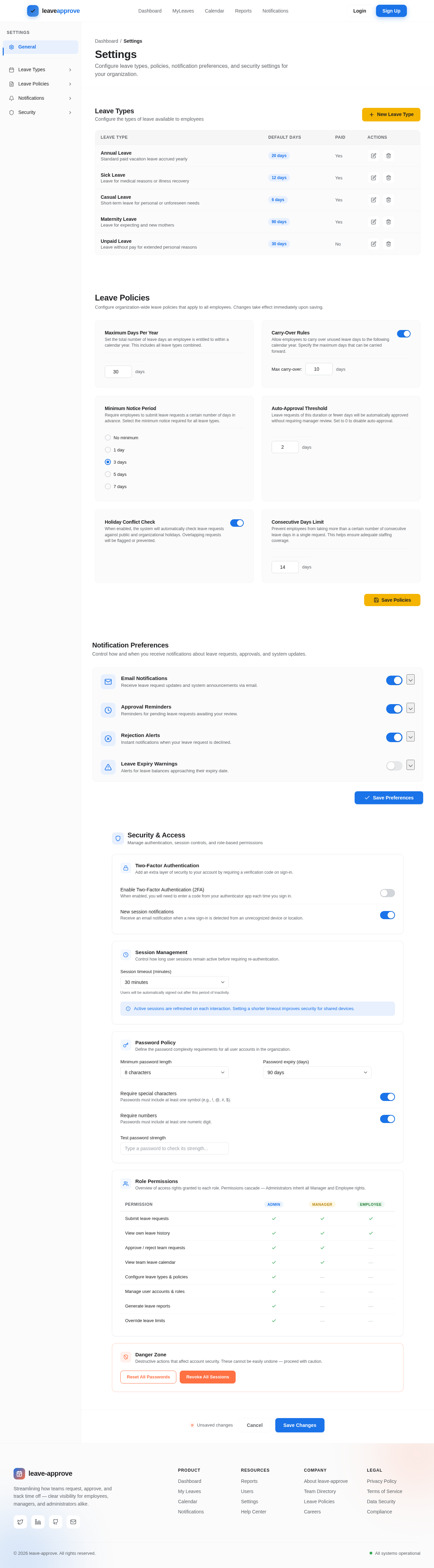
Configure leave types, policies, notification preferences, and security settings for your organization.
Configure the types of leave available to employees
| Leave Type | Default Days | Paid | Actions |
|---|---|---|---|
Annual Leave Standard paid vacation leave accrued yearly | 20 days | Yes | |
Sick Leave Leave for medical reasons or illness recovery | 12 days | Yes | |
Casual Leave Short-term leave for personal or unforeseen needs | 6 days | Yes | |
Maternity Leave Leave for expecting and new mothers | 90 days | Yes | |
Unpaid Leave Leave without pay for extended personal reasons | 30 days | No |
Configure organization-wide leave policies that apply to all employees. Changes take effect immediately upon saving.
Set the total number of leave days an employee is entitled to within a calendar year. This includes all leave types combined.
Allow employees to carry over unused leave days to the following calendar year. Specify the maximum days that can be carried forward.
Require employees to submit leave requests a certain number of days in advance. Select the minimum notice required for all leave types.
Leave requests of this duration or fewer days will be automatically approved without requiring manager review. Set to 0 to disable auto-approval.
When enabled, the system will automatically check leave requests against public and organizational holidays. Overlapping requests will be flagged or prevented.
Prevent employees from taking more than a certain number of consecutive leave days in a single request. This helps ensure adequate staffing coverage.
Control how and when you receive notifications about leave requests, approvals, and system updates.
Manage authentication, session controls, and role-based permissions
Add an extra layer of security to your account by requiring a verification code on sign-in.
Enable Two-Factor Authentication (2FA)
When enabled, you will need to enter a code from your authenticator app each time you sign in.
New session notifications
Receive an email notification when a new sign-in is detected from an unrecognized device or location.
Control how long user sessions remain active before requiring re-authentication.
Users will be automatically signed out after this period of inactivity.
Define the password complexity requirements for all user accounts in the organization.
Require special characters
Passwords must include at least one symbol (e.g., !, @, #, $).
Require numbers
Passwords must include at least one numeric digit.
Overview of access rights granted to each role. Permissions cascade — Administrators inherit all Manager and Employee rights.
| Permission | Admin | Manager | Employee |
|---|---|---|---|
| Submit leave requests | |||
| View own leave history | |||
| Approve / reject team requests | — | ||
| View team leave calendar | — | ||
| Configure leave types & policies | — | — | |
| Manage user accounts & roles | — | — | |
| Generate leave reports | — | — | |
| Override leave limits | — | — |
Destructive actions that affect account security. These cannot be easily undone — proceed with caution.

Submit, review, and approve leave requests in one intuitive workspace. Track balances, spot conflicts on a shared calendar, and keep everyone in sync — from employees to managers to administrators.
Paper forms, scattered approvals, and guesswork scheduling pile up into real lost time. leave-approve replaces all of it with one clear, shared flow.
Leave requests bounce between email threads, spreadsheets, and chat apps. Every hand-off adds delay and a fresh chance for requests to slip through the cracks.
Managers cannot see who is off, when, or why at a glance. Overlapping absences and coverage gaps are discovered far too late to plan around them.
Admins rekey balances, chase approvals, and stitch together reports by hand each week — hours of repetitive work that drains time from real people work.
Hover any date to peek at who's away, drag across days to block out a range, and click to open the full leave request. This is the heart of leave-approve.
Drag across dates to select a range · Hover for details · Click to open a request
From the first request to the final approval, leave-approve keeps employees, managers and administrators aligned — transparently and in real time.
Submit time off in seconds — pick a leave type, set your start and end dates, and track every request from a single dashboard.
Review every team request in one queue. Approve or reject with a click and keep your team moving — no more email back-and-forth.
Configure leave types and policies for your whole organization, then generate usage reports on demand.
The moment a decision is made, everyone knows. Instant alerts keep employees and managers perfectly in sync.
From submitting time off to approving requests and shaping policy, leave-approve adapts to how each person works.
leave-approve guides every leave request along a single transparent path — so employees, managers and admins always know exactly where things stand.
An employee picks their leave type, start and end dates, then sends the request in seconds.
The manager sees the request alongside team coverage and pending balances at a glance.
With full context, the manager approves or rejects the request in a single confident click.
The employee is instantly notified of the decision so nothing gets lost in inboxes.
Everyone tracks live leave status and history from one transparent, shared timeline.
Join teams who've replaced messy spreadsheets and email threads with leave-approve. Submit, review, and approve time-off requests in one clear, transparent workspace — for employees, managers, and admins alike.
No comments yet. Be the first!