J
John Smith
Jan 15, 2024
Great experience at our restaurant!
positivenew
 Aviral Shukla
Read the attached PRD document completely before writing any code. Treat the document as the single source of truth. Do not skip sections. Do not summarize the document. Follow every requirement in the document. --------------------------------------------------------- PROJECT NAME ReplyWise AI AI-Powered Reputation Management Platform --------------------------------------------------------- MISSION Build a production-ready SaaS platform exactly according to the attached specification. Do not generate a prototype. Do not generate a demo. Do not generate mock-only screens. Generate a real application ready for deployment. --------------------------------------------------------- RULES Never recreate the project. Always extend existing code. Never replace working modules. Keep the architecture scalable. Keep code clean. Follow best engineering practices. --------------------------------------------------------- TECH STACK Next.js 15 React 19 TypeScript Tailwind CSS shadcn/ui Supabase PostgreSQL Supabase Auth Supabase Storage OpenAI Recharts Vercel --------------------------------------------------------- ARCHITECTURE Use Feature-Based Architecture. Separate Components Services Repositories Providers Hooks Utilities Types API Database Never mix business logic inside UI components. --------------------------------------------------------- DATABASE Generate all tables described in the document. Create Indexes Relationships Foreign Keys Triggers where appropriate Row Level Security Supabase Policies Migration scripts --------------------------------------------------------- AUTH Implement Login Signup Forgot Password Email Verification Organization Support Multi-tenancy Role-based permissions --------------------------------------------------------- DESIGN Premium SaaS quality. Take inspiration from Stripe Linear Vercel Notion Raycast Everything must be Responsive Accessible Beautiful Consistent Fast --------------------------------------------------------- UX Every page must include Loading state Skeleton Empty state Error state Responsive layout Toast notifications Search Pagination Filters --------------------------------------------------------- QUALITY Strict TypeScript Reusable components Reusable hooks Reusable services No duplicated code No console errors No TypeScript errors Production-ready architecture --------------------------------------------------------- DEVELOPMENT PROCESS Implement the application module-by-module. Complete one module before moving to the next. Run quality checks after every module. Do not continue if compilation errors exist. --------------------------------------------------------- MODULE ORDER 1 Authentication 2 Dashboard 3 Reviews 4 Google Business Profile Integration 5 AI Reply Engine 6 Analytics 7 Locations 8 QR Codes 9 Review Requests 10 Settings 11 Billing 12 Business Advisor 13 Marketing 14 Automations 15 Reports 16 API 17 Deployment Optimization --------------------------------------------------------- GOOGLE BUSINESS PROFILE Prepare production-ready integration. Keep credentials inside environment variables. Never expose secrets. Create modular providers. --------------------------------------------------------- AI Use Provider Pattern. Current provider OpenAI Future providers Gemini Claude Azure OpenAI OpenRouter The UI should never depend directly on any provider. --------------------------------------------------------- OUTPUT Generate production-quality code. Every file should compile. Do not use placeholder implementations unless API credentials are required. If placeholders are required, clearly mark them. Create TODO comments only where external credentials are needed. Never stop after generating UI. Continue implementing backend, database, APIs, services, and integrations until the entire module is complete. --------------------------------------------------------- WHEN FINISHED Run a full project review. Identify Architecture issues Performance issues Security issues Accessibility issues Database improvements UI improvements Code duplication Missing requirements Automatically fix them. Repeat until the project is production-ready.


Sign in to leave a comment
Saturday, August 22, 2026
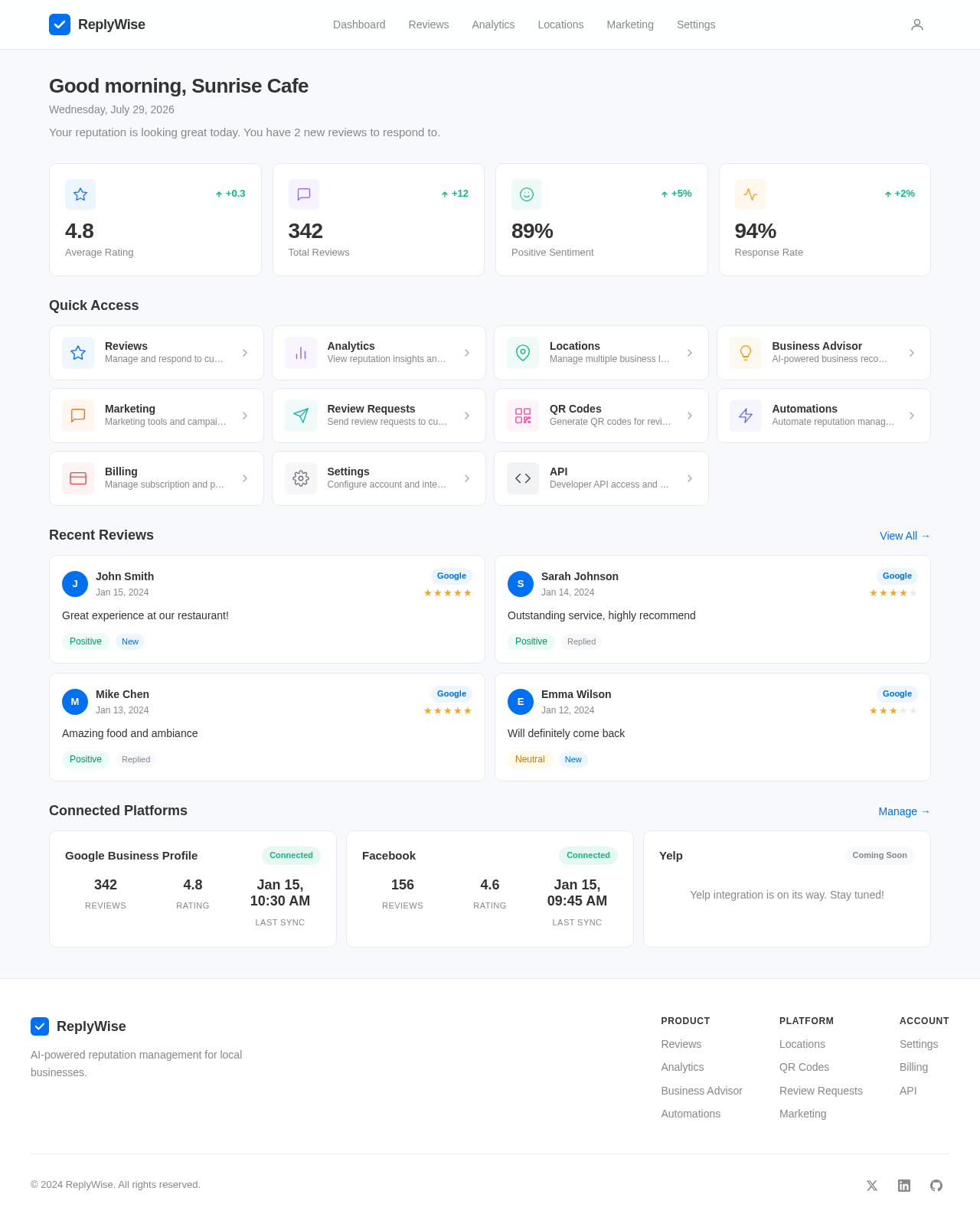
Your reputation is looking great today. You have 2 new reviews to respond to.
4.8
Average Rating
342
Total Reviews
89%
Positive Sentiment
94%
Response Rate
Manage and respond to customer reviews
View reputation insights and reports
Manage multiple business locations
AI-powered business recommendations
Marketing tools and campaigns
Send review requests to customers
Generate QR codes for reviews
Automate reputation management tasks
Manage subscription and payments
Configure account and integrations
Developer API access and docs
John Smith
Jan 15, 2024
Great experience at our restaurant!
Sarah Johnson
Jan 14, 2024
Outstanding service, highly recommend
Mike Chen
Jan 13, 2024
Amazing food and ambiance
Emma Wilson
Jan 12, 2024
Will definitely come back
Yelp integration is on its way. Stay tuned!

ReplyWise AI monitors reviews, generates intelligent responses, and helps you build a stellar online reputation — all from one platform.
Everything you need to build, monitor, and grow your online reputation.
AI handles review responses automatically, freeing your team to focus on what matters most.
Smart reply strategies that improve customer satisfaction and encourage positive reviews.
AI-powered sentiment analysis reveals what your customers truly feel about your business.
Manage reputation for all your business locations from a single, unified dashboard.
Everything you need to manage, analyze, and improve your online reputation.
Connect every platform where your customers leave reviews. More integrations coming soon.
"ReplyWise AI transformed how we handle reviews. Our response time dropped from days to minutes, and our rating climbed from 4.2 to 4.8 in just three months."
Join 1,000+ businesses using ReplyWise AI to build trust, engage customers, and grow their reputation on autopilot.
No comments yet. Be the first!