fiery-ppt
 Ayush Patel
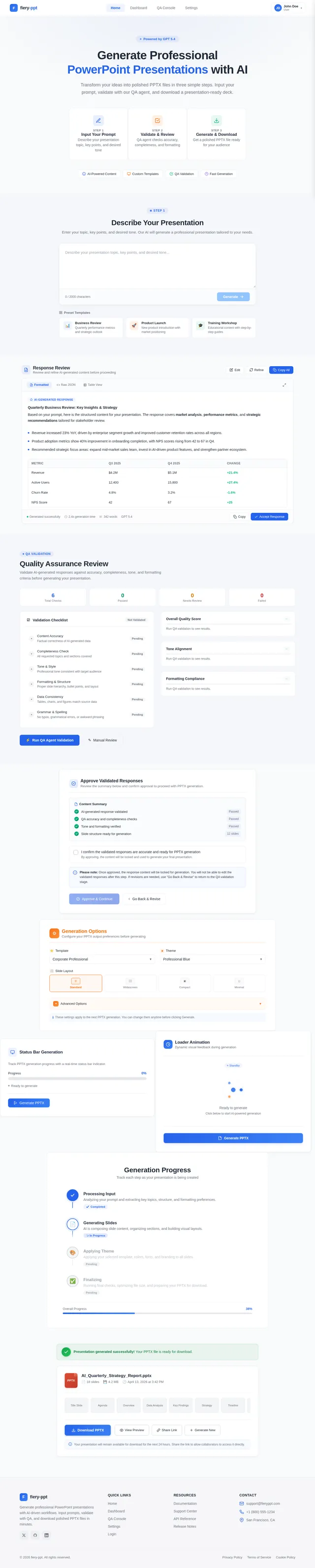
We discussed the point you have mentioned. To recap: * We currently have the functionality to upload PPT template (similar to word) * yes, we can have multiple prompts (get the text/tabular responses in our UI) * We can then insert curly brackets However, the structure above does not work well for PPT. Unlike word (mostly designed for text/tabular outputs), PPT comes to life with the designs/styles and structures of the slides. The only way we can produce a professional PPT is having the LLM produce it. Please refer to the call notes - what we need is a structure as follows: * We have a number of prompts. We get the text/tabular outputs in our UI. * User can check the responses / responses even go through our QA agent (once we have that functionality) * When its then ready - user clicks a button to generate the output and the data gets feeded into the LLM and LLM produces the final PPT output We need your guidance on above and how to go about this. If you have any other options / thoughtful suggestions, please present those to us as well on Monday. Check internally with your teams if they have come across the best way / best in class practice in relation to ppt outputs. ## Goal Create two UI designs on the same page for generating PPTX files (as 2 options for client), consistent with the provided UI images. ## Requirements 1. One UI for generating PPTX in the background with a status bar indicating progress. 2. Another UI for generating PPTX with a loader animation. 3. Both UIs should be displayed on the same page. 4. Each UI must include a "Generate PPTX" button . 5. Maintain consistency with the existing UI images while adding these elements. ## Context The instructions are based on the provided UI images and the need to incorporate these two generation methods on one page. <design_and_scope_constraints> - Use the existing UI images as a style and layout reference. - Do not create additional pages; both UIs must appear differntly one for 1st genrating pptx in background using status bar and one using loader. above are the instructions what we need to do just for context.
Comments (0)
Sign in to leave a comment
No comments yet. Be the first!