
earthy-build

byDeals Today India

Build a production-ready SaaS web app called “ChaseFlow” for invoice follow-up and collections automation for freelancers and small agencies. Core product idea: Users connect or manually add invoices, then the app automatically sends polite-to-firm reminder sequences for overdue payments, tracks responses, and helps recover invoices without awkward manual follow-ups. The app should feel like a narrow, valuable business tool, not a generic startup template. Product positioning: - Audience: freelancers, consultants, small agencies, and service businesses - Main promise: recover late payments automatically without damaging client relationships - Tone: calm, professional, trustworthy, efficient - Avoid flashy AI aesthetic, no purple gradients, no generic “all-in-one platform” copy Brand: - Name: ChaseFlow - Tagline: “Automate invoice follow-ups before cash flow slips.” - Accent color: restrained teal or deep green - Visual style: clean Swiss-inspired SaaS UI, compact typography, lots of clarity - Include a simple custom inline SVG logo Build as a single-page SaaS web app with hash-based routing and app-like navigation. Use static HTML/CSS/JS only. No backend required, but structure the app like a real SaaS product with realistic dummy data and simulated actions. Required views: 1. Marketing landing section 2. Login / signup screen 3. Main dashboard 4. Invoices list 5. Invoice detail view 6. Follow-up sequence builder 7. Clients view 8. Templates view 9. Analytics / recovery metrics 10. Settings / billing / sender identity Main workflows: 1. User adds invoice manually or imports sample invoice data 2. User assigns a follow-up sequence 3. System schedules reminders based on due date and overdue age 4. User sees status changes like upcoming, sent, opened, replied, paid, escalated 5. User can pause automation, send now, mark paid, or edit the sequence 6. Dashboard shows total outstanding, overdue amount, recovered this month, reply rate, and invoices at risk Important product logic to simulate: - Invoice statuses: draft, sent, due soon, overdue, reminder scheduled, reminder sent, client replied, paid, disputed - Follow-up stages: - Friendly reminder - Second reminder - Firm reminder - Final notice - Sequence timing examples: - 3 days before due date - 1 day after due date - 5 days after due date - 10 days after due date - 15 days after due date - Rules: - Stop reminders when invoice is marked paid - Pause reminders when a client replies - Allow manual resume - Highlight risky invoices over 20 days late - Show automation logs / timeline per invoice Include realistic sample data: - 12 to 20 invoices - Multiple clients - Different currencies - A mix of paid, overdue, disputed, and active follow-up states - Realistic amounts for freelancers/agencies, not enterprise invoicing Dashboard requirements: - KPI cards: - Outstanding amount - Overdue amount - Recovered this month - Reply rate - A chart for recovered revenue over time - A chart or breakdown for invoice states - A “needs attention” panel - Recent activity feed - Use tabular numbers for financial values Invoices view: - Search - Filters by status, client, overdue age - Sort by amount, due date, overdue days - Table with sticky header - Row actions: view, send now, pause, mark paid - Clicking a row opens detailed invoice panel or view Invoice detail view: - Client name - Invoice number - Amount - Issue date - Due date - Current status - Days overdue - Assigned sequence - Timeline of reminders and client events - Notes section - Buttons for send now, pause automation, mark paid, record reply, edit sequence Sequence builder: - Prebuilt reminder sequence templates - Editable subject lines and email copy - Delay controls by days - Tone selector: friendly, neutral, firm - Preview panel showing the exact sequence timeline - Show recommended default sequence - Include example reminder templates, but keep them concise and professional Templates section: Create 5 email templates: 1. Before due date reminder 2. Due date reminder 3. Friendly overdue reminder 4. Firm overdue reminder 5. Final notice Analytics section: - Recovery rate - Average days to payment - Most delayed clients - Best-performing reminder template - Monthly recovered amount - Aging buckets: current, 1-7 days, 8-14 days, 15-30 days, 30+ days Settings: - Sender name - Reply-to email - Business name - Timezone - Reminder send window - Auto-pause on reply toggle - Branding options for outgoing emails - Fake billing plan cards: - Starter - Pro - Agency UX requirements: - Use a real SaaS app layout with sidebar + top bar - Desktop: sidebar visible - Mobile: collapsible navigation - Dark mode and light mode with toggle - Compact web app typography; do not use oversized hero text inside the app - Strong focus states, accessible labels, semantic HTML - Empty states, loading skeletons, and polished status badges - Use one primary accent color only - No decorative blobs, no icon-in-colored-circle feature grid, no generic AI startup sections Landing section requirements: - Headline: “Stop chasing unpaid invoices manually.” - Subheadline: explain that ChaseFlow sends structured reminders and tracks replies so freelancers and small agencies recover cash faster - Sections: - Problem - How it works - Key benefits - Sample dashboard preview - Pricing - FAQ - Pricing cards: - Starter: for solo freelancers - Pro: for consultants and small studios - Agency: for teams managing many client invoices - CTA buttons: “Start free” and “View demo” - Keep copy specific and grounded, not generic marketing fluff Design system: - Professional, minimal, high-trust SaaS aesthetic - Neutral surfaces with a restrained teal accent - Web app style, not editorial style - Compact scale: - page title max at web-app appropriate size - body text readable - labels small but legible - Use a custom inline SVG logo - Include subtle shadows, soft borders, excellent spacing, and clear hierarchy Technical requirements: - Single HTML entry point - Use hash-based routing for multiple app views - Pure HTML/CSS/JS with CDN libraries if needed - No backend - Use in-memory state and sample data only - Simulate sending reminders and status changes with UI actions - Charts should render with a lightweight library or pure JS - Export buttons can be visual or simulated - Code should be organized and readable Must-have details: - Currency formatting - Overdue day calculations - Status badges with clear semantics - Activity timeline - Search and filtering - Responsive layout - Keyboard-friendly interactions - A polished feel across dashboard, tables, forms, and settings Do not build: - A generic invoicing app - Accounting/bookkeeping features - Payroll - Tax filing - Large enterprise AR suite features - AI chatbot gimmicks This should feel like a focused micro-SaaS MVP that a solo founder could actually launch and sell.

LandingClientsTemplatesAnalyticsLogin
Landing

Comments (0)

No comments yet. Be the first!

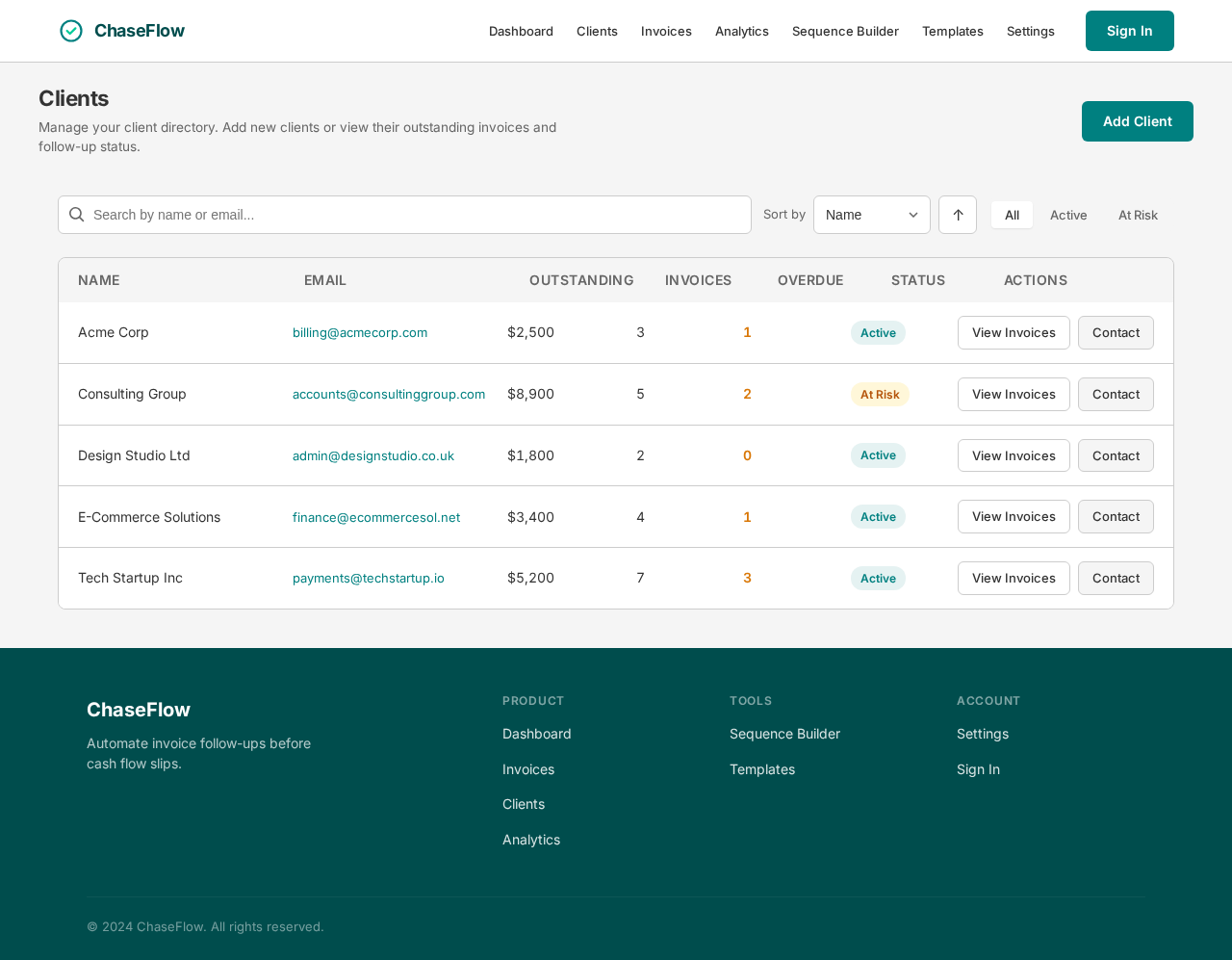
Clients design preview
Landing: View Info
Login: Sign In
Dashboard: View KPIs
Clients: View Clients
Invoices: Filter By Client
Invoice Detail: Review Status
Invoice Detail: Record Reply
Invoices: Sort By Overdue
Invoice Detail: Mark Paid
Analytics: View Delayed Clients
Sequence Builder: Adjust Tone
Settings: Update Timezone
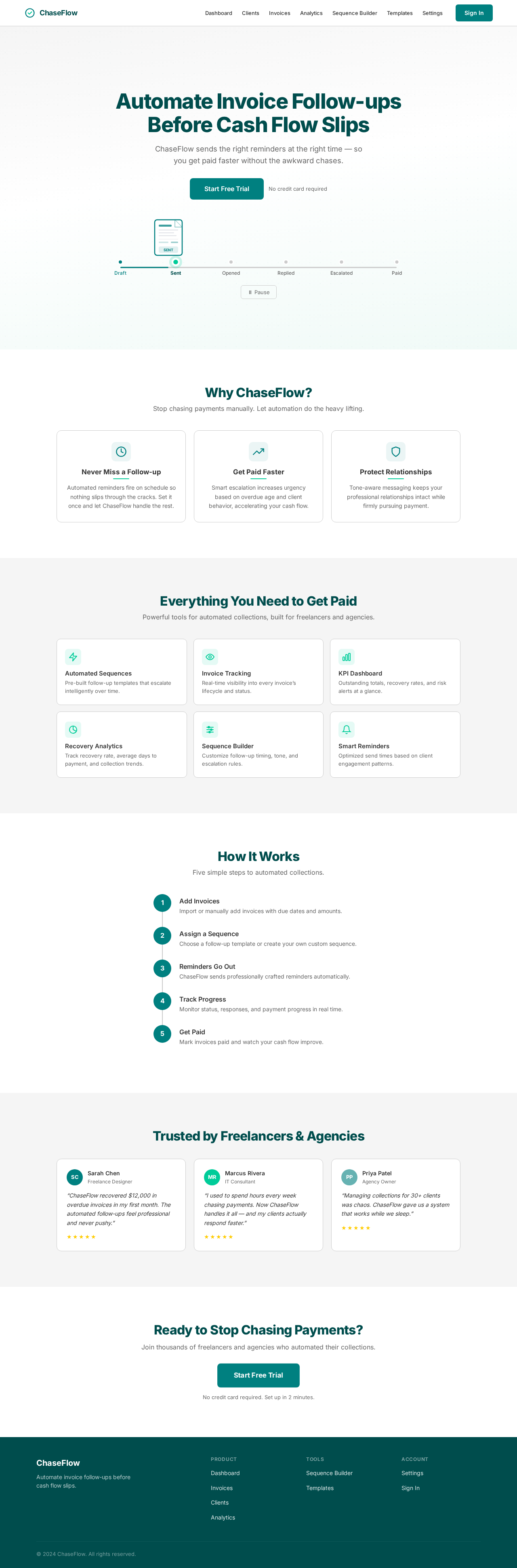
Landing design preview
Landing: View Info
Login: Sign In
Dashboard: View KPIs
Clients: View Clients
Invoices: Filter By Client
Invoice Detail: Review Status
Invoice Detail: Record Reply
Invoices: Sort By Overdue
Invoice Detail: Mark Paid
Analytics: View Delayed Clients
Sequence Builder: Adjust Tone
Settings: Update Timezone