Pos+71273a7d
 Trader Kumar
Build a point of sale system for a cafe with web ordering system


Comments (0)
Sign in to leave a comment
System Requirements
Pos+71273a7d System Requirements Document
Introduction
The Pos+71273a7d project aims to develop a comprehensive point of sale (POS) system tailored for a cafe environment. This system will include a web ordering component to enhance customer convenience and streamline cafe operations.
System Overview
The Pos+71273a7d system will integrate traditional point of sale functionalities with a modern web ordering system. This dual approach will allow cafe customers to place orders both in-person and online, providing flexibility and improving service efficiency.
Functional Requirements as Story Points
- As a Cafe Owner, I should be able to manage menu items, including adding, editing, and removing items.
- As a Cafe Owner, I should be able to track sales and generate reports to monitor business performance.
- As a Cafe Staff Member, I should be able to process in-person orders quickly and efficiently.
- As a Cafe Staff Member, I should be able to manage table assignments and reservations.
- As a Customer, I should be able to view the cafe menu online.
- As a Customer, I should be able to place an order through the web ordering system.
- As a Customer, I should be able to choose between pickup and delivery options.
- As a Customer, I should be able to make secure payments online.
- As a Customer, I should receive an order confirmation with estimated preparation and delivery times.
- As a Cafe Owner, I should be able to view and manage online orders through the POS system.
User Personas
- Cafe Owner: Manages the overall operations, menu, and sales reporting.
- Cafe Staff Member: Handles in-person orders, table management, and assists with online order fulfillment.
- Customer: Places orders either in-person or through the web ordering system, choosing between pickup or delivery.
Core User Flows
- In-Person Order Processing: Customer places order -> Staff enters order into POS -> Payment is processed -> Order is prepared -> Customer receives order.
- Web Order Processing: Customer views menu online -> Customer places order -> Payment is processed -> Order confirmation sent -> Order is prepared -> Customer picks up order or receives delivery.
- Menu Management: Owner logs into system -> Navigates to menu management -> Adds/edits/removes items -> Changes are saved and reflected in both POS and web systems.
Visuals Colors and Theme
- primary: #2A9D8F (Teal)
- primary_light: #A8DADC (Light Teal)
- secondary: #E76F51 (Coral)
- accent: #F4A261 (Orange)
- highlight: #F4A261 (Amber)
- bg: #F1FAEE (Off-white)
- surface: rgba(233, 233, 233, 0.8)
- text: #264653 (Dark Blue)
- text_muted: #6D6875 (Muted Gray)
- border: rgba(38, 70, 83, 0.2)
Signature Design Concept
The landing page for the Pos+71273a7d web ordering system will feature an interactive cafe scene. As users scroll, they will see a dynamic illustration of a cafe environment where orders are visually represented as they move from the customer's table to the kitchen and then to the delivery area. This will be achieved using motion/react for smooth animations and transitions. The scene will include interactive elements, such as clickable menu items that expand to show more details and animations that illustrate the order preparation process.
Landing Hero Motion Brief
The hero section will depict a seamless order journey: a customer at a virtual table selects items from a digital menu, the order is animatedly passed to a barista, and then prepared items are shown being packaged for delivery. This loop will run continuously, with interactive elements allowing users to click on menu items to see detailed descriptions and prices. The animation will be crafted using motion/react to ensure fluidity and responsiveness.
Interaction Model & Motion Direction
- Intended Interaction Model: Animated
- The landing page will feature moderate scroll-triggered reveals and hover transitions, with spring physics applied to interactive elements for a polished user experience.
Non-Functional Requirements
- The system must handle simultaneous online and in-person orders without performance degradation.
- The web ordering system must be mobile-responsive to accommodate customers using smartphones.
- Secure payment processing must comply with industry standards to protect customer data.
Tech Stack
- Frontend: React for Web
- Backend: Python, FastAPI
- Database: MySQL or MariaDB, using Alembic for migrations
- AI Tools: Not applicable unless specified
- Orchestration: Docker, Kubernetes
Assumptions and Constraints
- The cafe operates within the Indian timezone (IST).
- The currency for all transactions will be INR.
- The system will initially support English, with potential for additional languages in future updates.
Glossary
- POS: Point of Sale
- IST: Indian Standard Time
- INR: Indian Rupee
This document outlines the comprehensive requirements for the Pos+71273a7d project, ensuring a robust and user-friendly POS system with integrated web ordering capabilities.
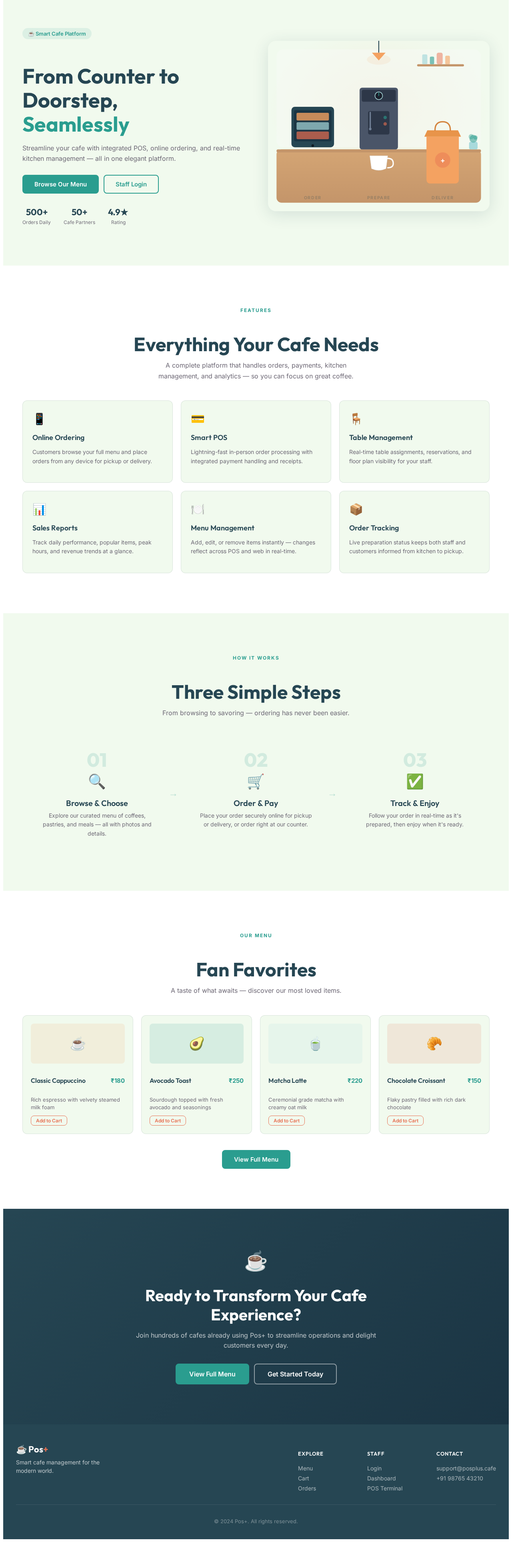
From Counter to Doorstep,
Seamlessly
Streamline your cafe with integrated POS, online ordering, and real-time kitchen management — all in one elegant platform.
Everything Your Cafe Needs
A complete platform that handles orders, payments, kitchen management, and analytics — so you can focus on great coffee.
Online Ordering
Customers browse your full menu and place orders from any device for pickup or delivery.
Smart POS
Lightning-fast in-person order processing with integrated payment handling and receipts.
Table Management
Real-time table assignments, reservations, and floor plan visibility for your staff.
Sales Reports
Track daily performance, popular items, peak hours, and revenue trends at a glance.
Menu Management
Add, edit, or remove items instantly — changes reflect across POS and web in real-time.
Order Tracking
Live preparation status keeps both staff and customers informed from kitchen to pickup.
Three Simple Steps
From browsing to savoring — ordering has never been easier.
Browse & Choose
Explore our curated menu of coffees, pastries, and meals — all with photos and details.
Order & Pay
Place your order securely online for pickup or delivery, or order right at our counter.
Track & Enjoy
Follow your order in real-time as it's prepared, then enjoy when it's ready.
Ready to Transform Your Cafe Experience?
Join hundreds of cafes already using Pos+ to streamline operations and delight customers every day.
From Counter to Doorstep,
Seamlessly
Streamline your cafe with integrated POS, online ordering, and real-time kitchen management — all in one elegant platform.
Everything Your Cafe Needs
A complete platform that handles orders, payments, kitchen management, and analytics — so you can focus on great coffee.
Online Ordering
Customers browse your full menu and place orders from any device for pickup or delivery.
Smart POS
Lightning-fast in-person order processing with integrated payment handling and receipts.
Table Management
Real-time table assignments, reservations, and floor plan visibility for your staff.
Sales Reports
Track daily performance, popular items, peak hours, and revenue trends at a glance.
Menu Management
Add, edit, or remove items instantly — changes reflect across POS and web in real-time.
Order Tracking
Live preparation status keeps both staff and customers informed from kitchen to pickup.
Three Simple Steps
From browsing to savoring — ordering has never been easier.
Browse & Choose
Explore our curated menu of coffees, pastries, and meals — all with photos and details.
Order & Pay
Place your order securely online for pickup or delivery, or order right at our counter.
Track & Enjoy
Follow your order in real-time as it's prepared, then enjoy when it's ready.
Ready to Transform Your Cafe Experience?
Join hundreds of cafes already using Pos+ to streamline operations and delight customers every day.
No comments yet. Be the first!