
KATR

byPriyangshu Bhowmick

https://katr-creator-os.emergent.host continue building this website further based on these discriptions # KATR MVP – Product & UI/UX Design Prompt ## Project Overview I want to build a modern SaaS web application called **KATR**. Tagline: **We Connect. You Create.** KATR is **NOT just another influencer marketplace**. It is a **Creator Operating System** that helps creators manage, grow, and monetize their creator business while enabling businesses to discover and collaborate with creators. Think of it as a combination of: • LinkedIn (professional profile) • Notion (workspace) • Jira (project management) • Shopify (creator commerce) • Influencer marketplace (creator discovery) The product should look premium, minimal, modern and startup-focused. The inspiration for the UI/UX is Influish, but the final design should be original and should not copy its layouts or branding. --- # Brand Identity Use the colors from the KATR logo. Design language: • Modern SaaS • Clean • Rounded cards • Large white spaces • Glassmorphism where appropriate • Premium gradients • Minimal icons • Smooth animations • Responsive design Avoid bright Instagram-like gradients. The platform should feel closer to Notion, Linear, Stripe or Framer than a social media app. --- # Landing Page Sections: Hero Section Headline: "The Operating System for the Creator Economy" Subheadline: Manage collaborations, discover opportunities, showcase your work and grow your creator business from one platform. Buttons: Join as Creator Join as Business Background should include subtle illustrations connecting creators, brands and opportunities. --- Section 2 How it Works Creator creates profile Businesses discover creators Collaborations begin Campaigns managed Payments tracked Growth measured --- Section 3 Who Is It For Cards: Established Creators Growing Creators Aspiring Creators Businesses Startups Events --- Section 4 Platform Features Creator Dashboard Campaign Marketplace Portfolio Analytics Payments Affiliate Hub Courses Events AI Assistant --- Section 5 Testimonials Placeholder --- Section 6 FAQ --- Footer --- Authentication Login Signup Forgot Password Google Login Instagram Connection (placeholder) --- After Login Two onboarding options Join as Creator Join as Business Each user gets a completely different dashboard. --- # Creator Dashboard Left Sidebar Dashboard Profile Campaigns Projects Courses Affiliate Links Events Payments Portfolio Analytics AI Assistant Settings Top Navbar Search Notifications Messages Profile Main Dashboard Cards: Active Campaigns Pending Payments Upcoming Deadlines Monthly Revenue Profile Views Opportunities Recent Activity Timeline --- # Creator Profile Professional portfolio page. Includes: Profile Picture Banner Bio Categories Social Links Instagram LinkedIn YouTube Website Followers Engagement Portfolio Gallery Past Collaborations Services Offered Courses Affiliate Links Products Contact Button Availability Status Verification Badge placeholder --- # Campaign Marketplace Grid layout. Filters: Budget Category Platform Location Followers Campaign Type Paid Barter Affiliate UGC Creator clicks campaign. Campaign page contains: Requirements Budget Timeline Deliverables Brand Profile Apply Button --- # Campaign Workspace Like Jira. Campaign Overview Timeline Deliverables Approval Status Files Comments Invoices Payments Calendar Progress Tracker --- # Portfolio Visual cards. Images Videos Campaign Results Case Studies Media Kit Download Portfolio --- # Payments Cards: Pending Received Upcoming Charts Revenue Invoices Transactions --- # Affiliate Hub Affiliate Products Performance Clicks Revenue Links --- # Creator Store Future-ready module. Products Courses Consultations Digital Downloads Merchandise --- # Events Events Feed Upcoming Events Paid Events Free Events Networking Register Tickets QR Code placeholder --- # AI Assistant Floating AI chat. Examples: Recommend campaigns. Suggest pricing. Help me write a proposal. Find creators in my niche. Analyse my profile. Future integrations only. --- # Business Dashboard Sidebar Dashboard Discover Creators Campaigns Applications Messages Analytics Events Settings --- Business Dashboard Cards Campaigns Running Applications Received Top Creators Campaign ROI Pending Approvals Upcoming Deliverables --- Creator Discovery Beautiful grid. Creator cards include: Photo Followers Engagement Niche Location Categories Rating Portfolio Work With Creator button Advanced Filters --- Campaign Creation Business creates campaign. Fields: Campaign Name Description Budget Timeline Platform Requirements Creator Type Location Attachments Publish --- Campaign Management Kanban style. Draft Active Review Completed Archived --- Analytics Campaign Performance Creator Performance Reach Estimated ROI Charts --- Events Dashboard Businesses can: Create Events Manage Registrations Manage Attendees Ticket Sales Creator Invitations --- General Design Rounded corners Smooth transitions Modern typography Professional illustrations Consistent spacing Beautiful empty states Loading skeletons Hover animations Mobile responsive Dark mode support --- Technical Stack Use a scalable architecture. Use dummy data where APIs are unavailable. Instagram integration should remain a placeholder for future Meta API integration. No backend logic is required beyond what is necessary for an MVP demonstration. --- Overall Goal This should feel like a product that could realistically compete with modern SaaS platforms. Users should immediately understand that KATR is a professional operating system for creators and businesses, not another social media platform. Build a full-stack web application called katr-creator-os using FastAPI, React, and MongoDB. This is a Creator Operating System for managing creative workflows. The app needs a responsive landing page, a complete authentication flow (Login, Signup, and Forgot Password), and a dedicated onboarding experience for new users. The architecture should be modular to allow for future features like dashboard widgets or task management. Important considerations: Is this tailored for a specific niche like YouTubers or writers, and what is the core problem it solves for them on day one

LandingAdminDiscoveryPaymentsSignupAI AssistantOnboardingProfileMarketplaceDashboardApplicationsPortfolioSettingsCampaignWorkspaceEventsAnalyticsCampaignsLogin
Landing

Comments (0)

No comments yet. Be the first!

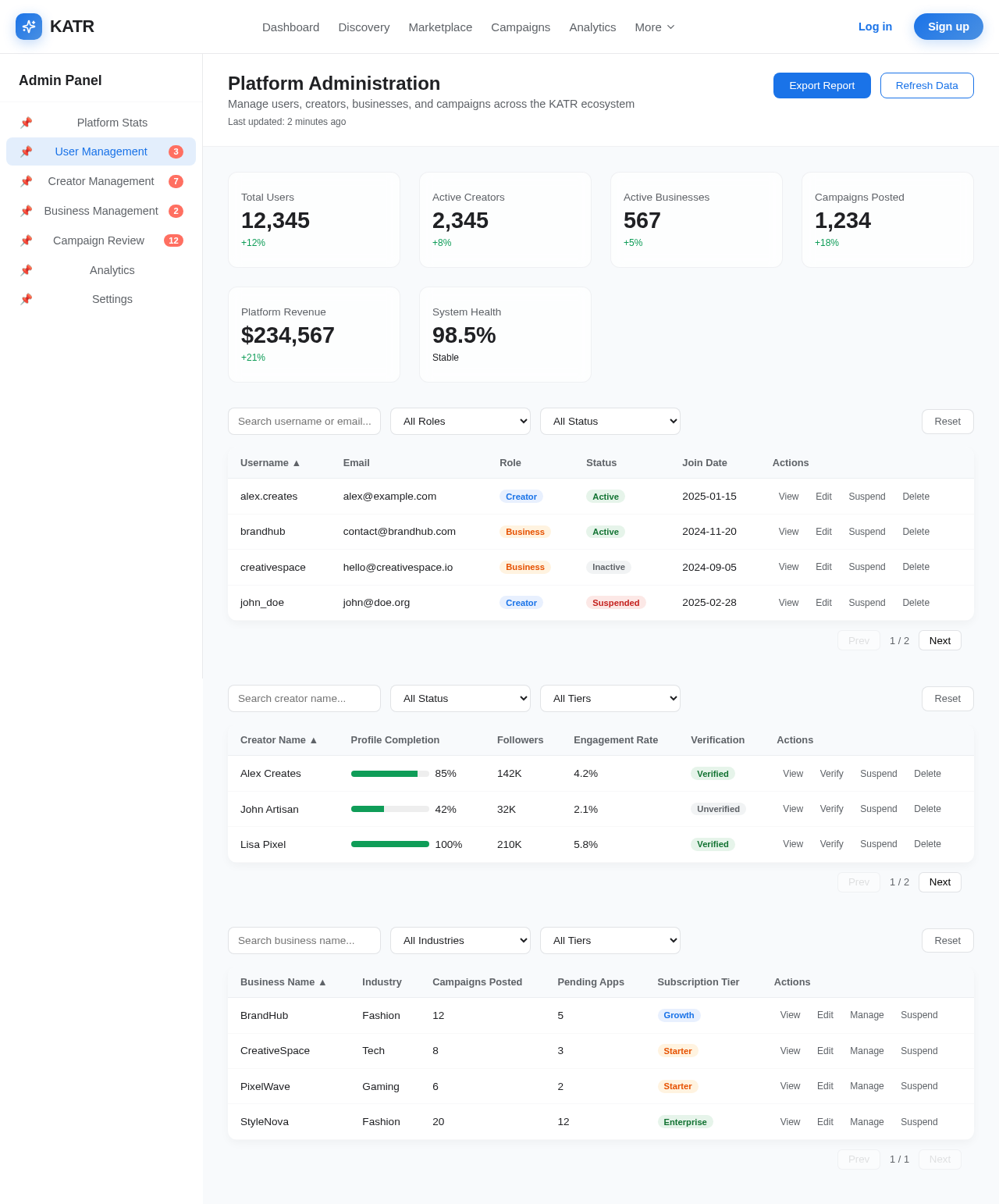
Admin design preview
Landing: View Info
Login: Sign In
Admin: View Platform Stats
Admin: Manage Users
Admin: Manage Creators
Admin: Manage Businesses
Admin: Review Campaigns
Admin: Monitor Analytics
Settings: Configure Platform