Instagram's SMmpanel
 Google Wala
Build a mobile-first Instagram Growth Panel application. Tech Stack: - React + Vite - Node.js + Express - PostgreSQL - JWT Authentication Theme: - Dark mode - Instagram-inspired design - Modern cards - Bottom navigation - Responsive mobile UI Create: Authentication: - Login - Register - Forgot Password Database: - Users - Services - Orders - Transactions Bottom Navigation: - Home - Services - Orders - Add Funds Follow clean folder structure and production-ready coding standards.


Comments (0)
Sign in to leave a comment
System Requirements
Instagram's SMmpanel System Requirements Document
1. Introduction
This document outlines the system requirements for Instagram's SMmpanel, a mobile-first Instagram Growth Panel application. The application is designed to facilitate the management and growth of Instagram accounts through various services. It includes features for user authentication, service management, order processing, and financial transactions, all within a responsive and modern user interface.
2. System Overview
Instagram's SMmpanel is a web-based platform that allows users to manage Instagram growth services. It is built with a mobile-first approach, ensuring optimal performance and usability on mobile devices. The application leverages a modern tech stack and adheres to best practices in coding standards and security.
3. Functional Requirements
User Stories
- As a user, I want to register an account so that I can access the platform's services.
- As a user, I want to log in to my account using my credentials.
- As a user, I want to reset my password if I forget it.
- As a user, I want to view and navigate through the home, services, orders, and add funds sections via bottom navigation.
- As a user, I want to view available Instagram growth services.
- As a user, I want to place an order for a service.
- As a user, I want to add funds to my account balance.
- As a user, I want to view my order history.
- As a user, I want to manage my profile information.
- As a user, I want to ensure my transactions are logged and secure.
- As a user, I want to receive feedback on API actions, including validation and error handling.
- As a user, I want to prevent duplicate orders from being placed.
- As a user, I want to ensure my balance is validated before placing an order.
- As a user, I want to ensure the Instagram URL is validated before placing an order.
- As a user, I want to ensure that all business logic is handled on the backend for security.
- As a user, I want the system to handle API failures gracefully to ensure a smooth user experience.
- As a user, I want the system to validate input to prevent errors and ensure data integrity.
4. User Personas
- Regular User: Individuals looking to grow their Instagram presence through various services offered by the platform.
- Admin: Personnel responsible for managing the platform, including user management, service management, and order processing.
5. Core User Flows
User Registration and Authentication
- User accesses the registration page.
- User enters required information and submits the form.
- System creates a new user account and sends a confirmation email.
- User logs in using their credentials.
- User can reset their password if forgotten.
Service Browsing and Ordering
- User navigates to the services page.
- User browses available services.
- User selects a service and fills out the order form.
- System validates the order details and processes the order.
- User receives confirmation of the order.
Fund Management
- User navigates to the add funds page.
- User selects a payment method and enters the amount.
- System processes the payment and updates the user's balance.
- User receives confirmation of the transaction.
6. Visuals Colors and Theme
- Theme: Dark mode with an Instagram-inspired design.
- Design Elements: Modern cards, bottom navigation, responsive mobile UI.
Color Palette
- primary: #1A1A1D (dark slate)
- primary_light: #4E4E50 (charcoal)
- secondary: #C3073F (crimson)
- accent: #950740 (deep magenta)
- highlight: #FF5733 (vibrant orange)
- bg: #121212 (rich black)
- surface: rgba(255, 255, 255, 0.1) (translucent white)
- text: #FFFFFF (white)
- text_muted: #B0B0B0 (light gray)
- border: rgba(255, 255, 255, 0.2) (soft white)
7. Signature Design Concept
- Design Concept: The homepage features an interactive, 3D carousel of Instagram posts that users can swipe through. Each post is a card that flips to reveal service details when clicked. The background subtly shifts colors in response to user interactions, creating a dynamic and engaging experience. This concept will be implemented using
@react-three/fiberfor 3D rendering andframer-motionfor smooth animations.
8. Interaction Model & Motion Direction
- Interaction Model: Parallax with layered depth via scroll. Decorative layers translate at different speeds, while real content scrolls naturally.
- Motion Direction: Smooth transitions and animations that enhance user experience without compromising functionality.
9. Non-Functional Requirements
- Performance: The application must load quickly and perform efficiently on mobile devices.
- Security: Implement JWT authentication and ensure secure handling of user data and transactions.
- Scalability: The system should be able to handle an increasing number of users and transactions.
10. Tech Stack
- Frontend: React + Vite
- Backend: Node.js + Express
- Database: PostgreSQL
- Authentication: JWT
11. Assumptions and Constraints
- The application will prioritize correctness, validation, error handling, security, and performance.
- Business logic will be maintained on the backend to ensure security and integrity.
- Database transactions will be used for balance deduction, order creation, and fund addition.
12. Glossary
- JWT: JSON Web Token, a compact, URL-safe means of representing claims to be transferred between two parties.
- API: Application Programming Interface, a set of functions and procedures allowing the creation of applications that access the features or data of an operating system, application, or other service.
- SMM: Social Media Marketing, the use of social media platforms to promote a product or service.
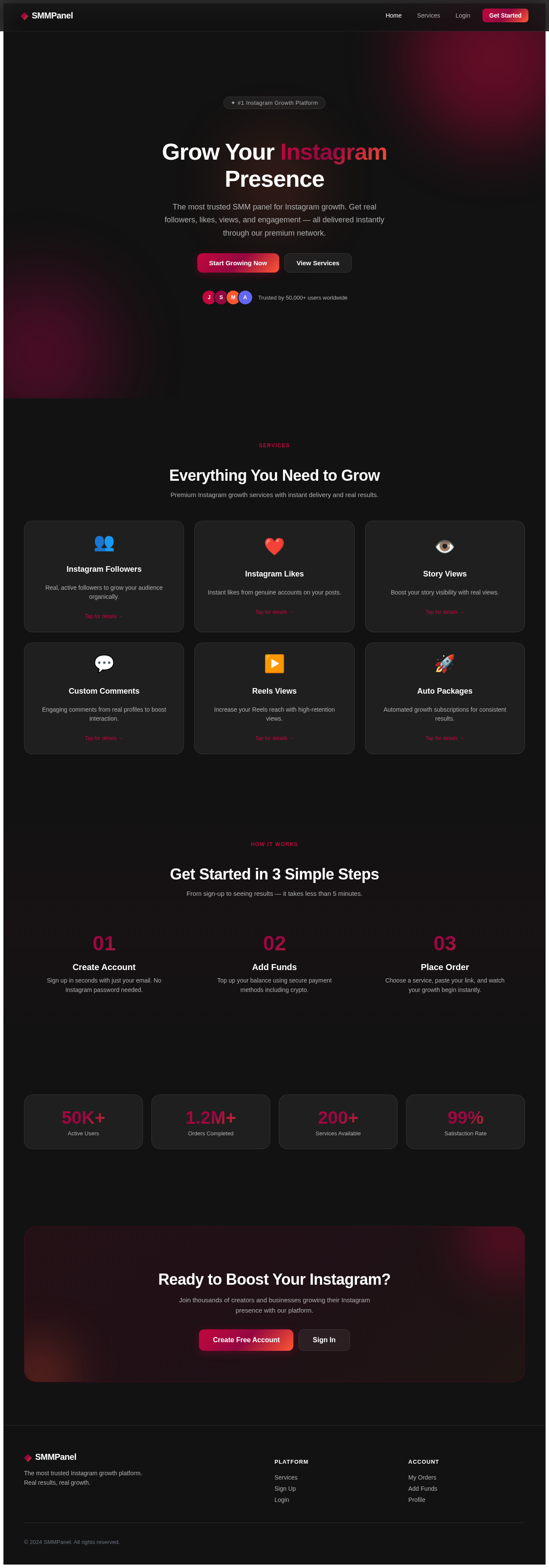
Grow Your Instagram Presence
The most trusted SMM panel for Instagram growth. Get real followers, likes, views, and engagement — all delivered instantly through our premium network.
Everything You Need to Grow
Premium Instagram growth services with instant delivery and real results.
Instagram Followers
Real, active followers to grow your audience organically.
Tap for details →Instagram Followers
Starting from $0.99 per 100. Gradual delivery over 1-7 days. No password required.
Order NowInstagram Likes
Instant likes from genuine accounts on your posts.
Tap for details →Story Views
Boost your story visibility with real views.
Tap for details →Custom Comments
Engaging comments from real profiles to boost interaction.
Tap for details →Reels Views
Increase your Reels reach with high-retention views.
Tap for details →Auto Packages
Automated growth subscriptions for consistent results.
Tap for details →Get Started in 3 Simple Steps
From sign-up to seeing results — it takes less than 5 minutes.
Create Account
Sign up in seconds with just your email. No Instagram password needed.
Add Funds
Top up your balance using secure payment methods including crypto.
Place Order
Choose a service, paste your link, and watch your growth begin instantly.
Ready to Boost Your Instagram?
Join thousands of creators and businesses growing their Instagram presence with our platform.
No comments yet. Be the first!